User LEDs
The User LEDs control displays the current state of the user LEDs. Toggle the LED
buttons to turn the board LEDs on and off. Click the All button to reverse the state of
all the LEDs.
User Dip Switches
The User Dip Switches control display the status of the USER_SW[0:3] (S1) and
USER_SW[4:7] (S6).
Push Buttons
The Push Buttons control shows the status of PB0 (S2) and PB1 (S3).
Qsys Memory Map
The Qsys Memory Map control shows the memory map of bts_config.sof design
running on your board.
4.2.5. The XCVR Tab
The XCVR tab allows you to run transceiver tests on your board. You can run the test
using either electrical loopback modules or optical fiber modules.
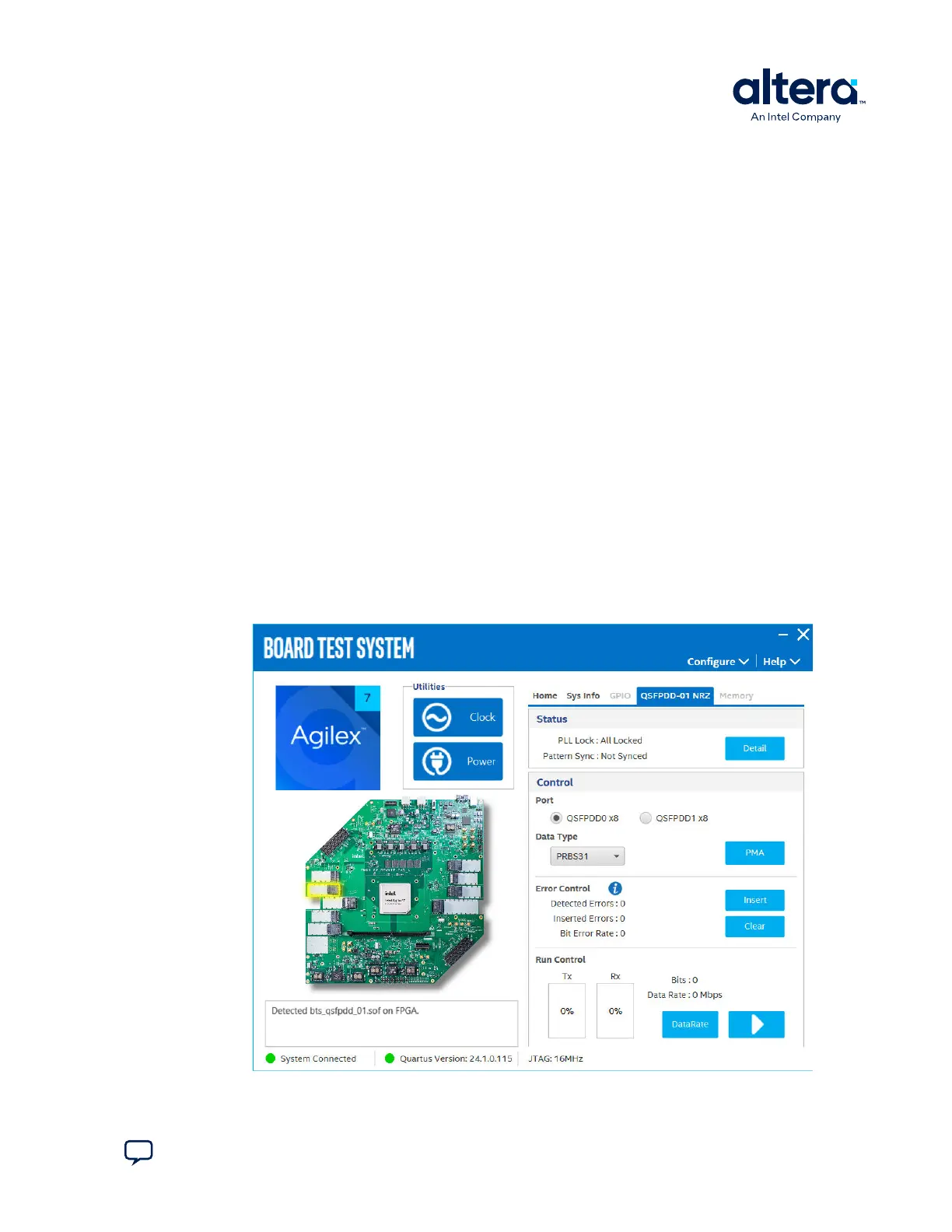
4.2.5.1. The QSFPDD NRZ Tab
Figure 11. The QSFPDD-01 NRZ Tab
4. Board Test System
776646 | 2024.11.21
Send Feedback
Agilex
™
7 FPGA I-Series Transceiver (6 × F-Tile) Development Kit User Guide
21








 To Next Page