7. Document Revision History for the Agilex 7 FPGA I-
Series Transceiver (6 × F-Tile) Development Kit User
Guide
Document
Version
Changes
2024.11.21 • Updated the Overview chapter:
— Updated Table: Ordering Information:
• Replaced the device part number for the Agilex 7 FPGA I-Series Transceiver Development Kit
(Production1 6 × F-Tile) in Table: Ordering Information from "AGIC040R39A1E1VB" to
"AGIC040R39A1E1VC".
• Updated the serial number identifiers for the production and ES1 development kits.
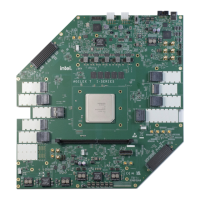
— Added new Figure: Agilex 7 FPGA I-Series Transceiver Development Kit—Top View.
— Updated Figure: Agilex 7 FPGA I-Series Transceiver Development Kit—Block Diagram.
— Updated Feature Summary.
— Updated Recommended Operating Conditions.
• Updated the Getting Started chapter:
— Added new topics:
• Before You Begin
• Handling the Board
• Installing the Quartus Prime Pro Edition Software
• Installing the Intel SoC EDS
• Installing the Development Kit
• Installing the Intel FPGA Download Cable II Driver
— Removed the following topics:
• Quick Start Guide
• Design Examples
• Updated and retitled chapter Power Up the Development Kit to Development Kit Setup.
— Retitled topic Power Up to Powering Up the Development Kit.
— Retitled topic Perform Board Restore to Performing Board Restore.
— Retitled topic Restore board System Intel MAX 10 with default factory image to Restoring Board
System Intel 10 with Default Factory Image.
— Retitled topic Restore Board QSPI Flash with the Default Factory Image to Restoring Board QSPI
Flash with the Default Factory Image.
• Updated the Board Test System chapter:
— Updated and retitled topic Installing Quartus Prime Software to Setting Up the Quartus Prime
Software for BTS Operation.
— Updated all the figures in the BTS Functionalities chapter.
— Retitled topic Test the Functionality of the Development Kit to BTS Functionalities.
— Retitled topic The QSFPDD400 PAM4 Tab to The QSFPDD400/QSFPDD800 PAM4 Tab.
• Updated the Development Kit Hardware and Configuration chapter:
— Retitled topic Configure the FPGA Device by Active Serial (AS) Modes (Default Mode) to
Configuring the FPGA Device by Active Serial (AS) Modes (Default Mode).
— Retitled topic Configure the FPGA Device by Avalon-ST (AvST) Modes to Configuring the FPGA
Device by Avalon Streaming Modes.
• Retitled appendix chapter Additional Information to Safety and Regulatory Compliance Information.
• Restructured the document to improve clarity and for ease of reference.
• Updated the document for the latest branding standards.
2023.05.31
Initial release.
776646 | 2024.11.21
Send Feedback
©
Altera Corporation. Altera, the Altera logo, the ‘a’ logo, and other Altera marks are trademarks of Altera
Corporation. Altera and Intel warrant performance of its FPGA and semiconductor products to current
specifications in accordance with Altera’s or Intel's standard warranty as applicable, but reserves the right to
make changes to any products and services at any time without notice. Altera and Intel assume no
responsibility or liability arising out of the application or use of any information, product, or service described
herein except as expressly agreed to inwriting by Altera or Intel. Altera and Intel customers are advised to
obtain the latest version of device specifications before relying on any published information and before placing
orders for products or services.
*Other names and brands may be claimed as the property of others.
ISO
9001:2015
Registered








 To Next Page