2.3.3. Installing the Development Kit
1. Download the Agilex 7 FPGA I-Series Transceiver Development Kit installer
package from the Agilex 7 FPGA I-Series Transceiver Development Kit webpage on
the Intel website.
2. Unzip the Agilex 7 FPGA I-Series Transceiver Development Kit installer package.
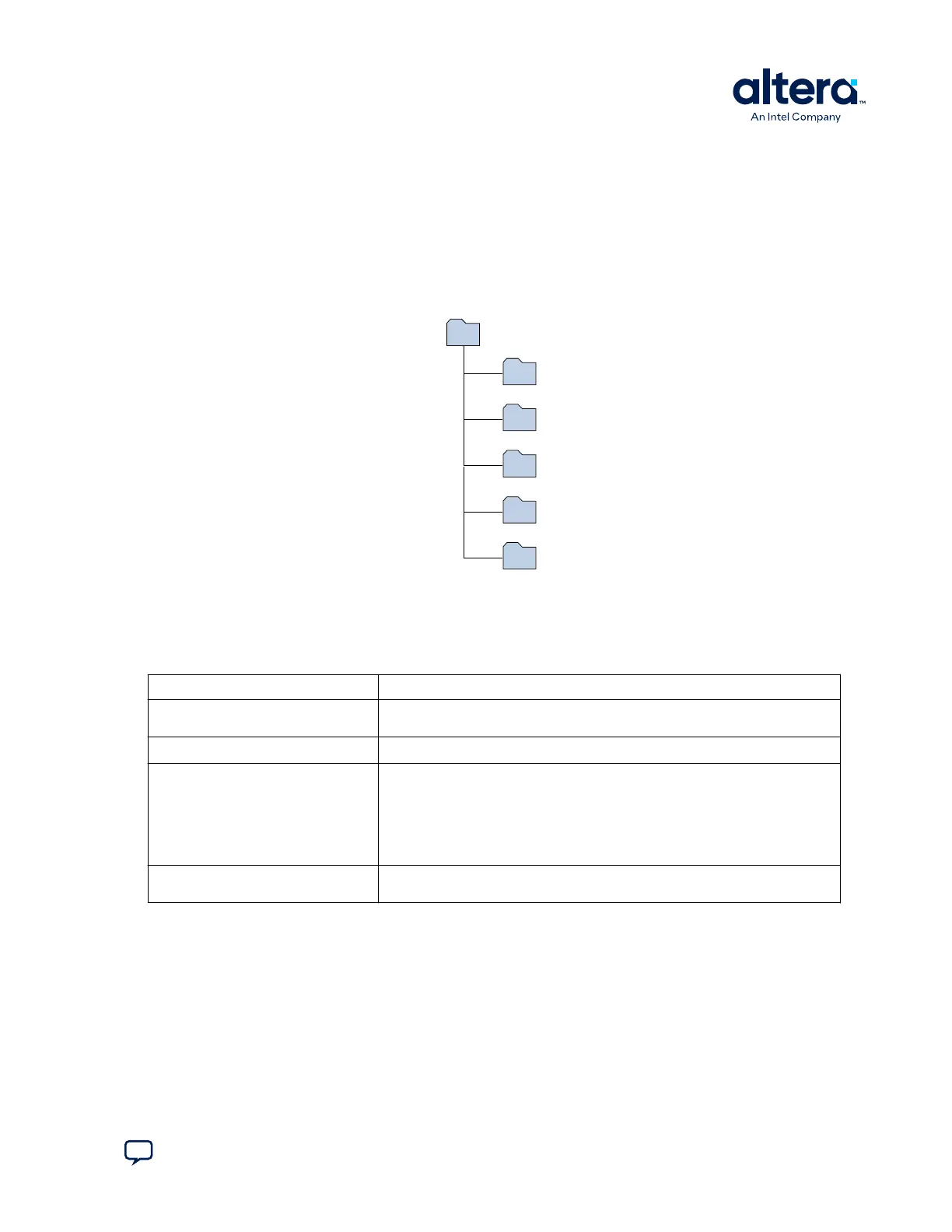
The package creates the directory structure shown in the figure below.
Figure 3. Agilex 7 FPGA I-Series Transceiver Development Kit Directory Structure
documents
board_design_files
examples
factory_recovery
demos
<package rootdir>
3. For the latest issues and release notes, Altera recommends that you review the
readme.txt located in the root directory of the kit installation.
Table 3. Installed Development Kit Directory Description
Lists the file directory names and a description of their contents.
Directory Name
Description of Directory Contents
board_design_files
Contains schematics, layout, assembly, and Bill of Material (BOM) board design
files. Use these files as a starting point for a new prototype board design.
documents
Contains the development kit documentation.
examples
Contains the sample design files for the Agilex 7 FPGA I-Series Transceiver
Development Kit:
• QSPI image, system MAX
®
10 image
• Board Test System (BTS): BTS GUI, Clock GUI, and Power GUI
• Golden Top project for pinout assignments management
• Design Examples: Memory, XCVR, GPIO, and PCIe* 4.0
factory_recovery
Contains the original data programmed onto the board before shipment. Use this
data to restore the board with its original factory contents.
2. Getting Started
776646 | 2024.11.21
Send Feedback
Agilex
™
7 FPGA I-Series Transceiver (6 × F-Tile) Development Kit User Guide
9








 To Next Page