iStorage datAshur® PRO
+
C
User Manual v1.0
19
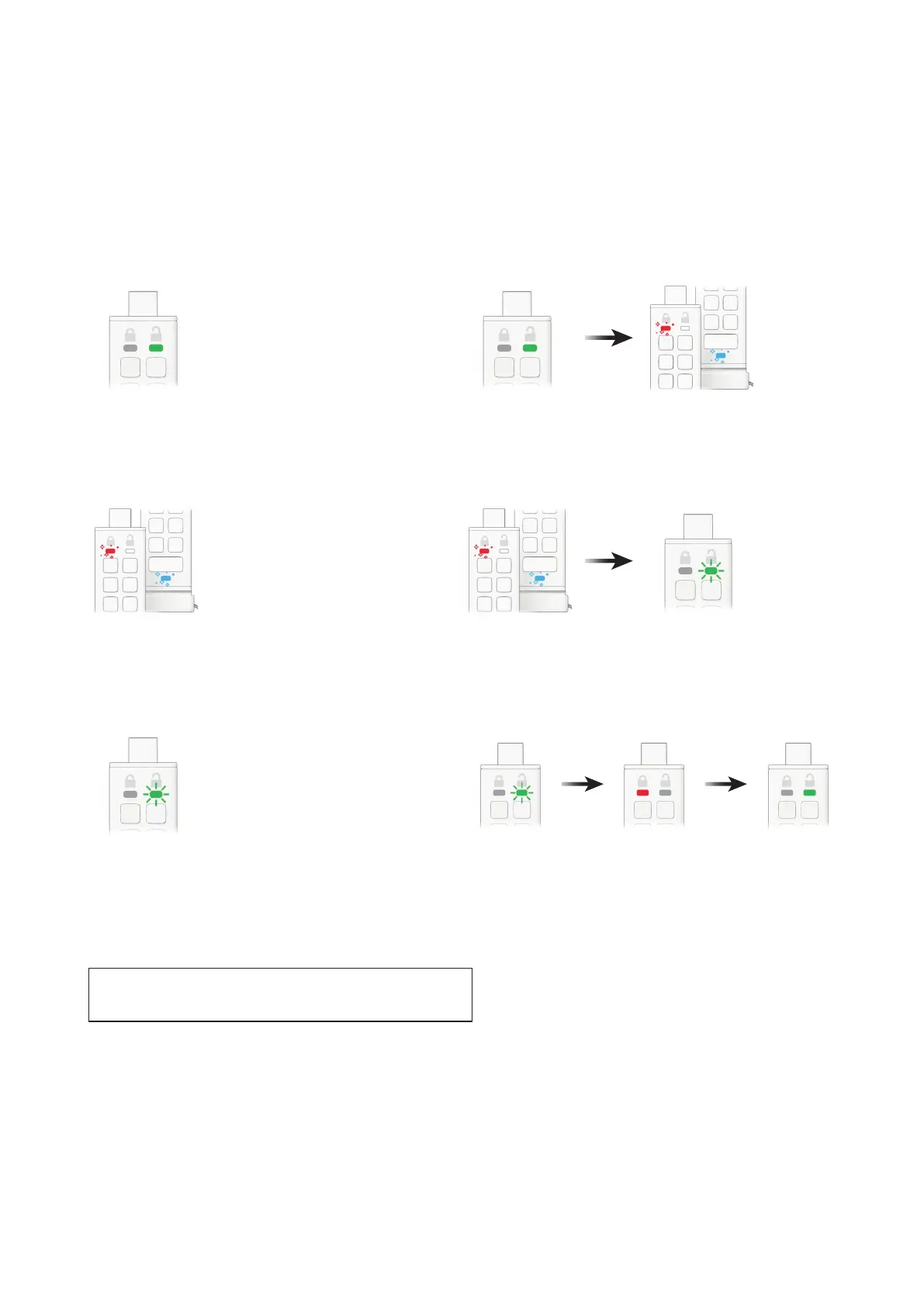
To create an Admin PIN in User mode, proceed with the following steps.
1. Unlock the datAshur PRO
+
C with your User PIN
GREEN LED will be solid indicating successful User PIN entry.
3. Enter your new 8-15 digit Admin PIN
RED and BLUE LEDs will continue to icker together.
5. Re-enter your new Admin PIN
GREEN LED will continue to blink.
2. Press and hold down the number 1 button and press the
KEY button TWICE (double click)
Solid GREEN LED will switch to ickering RED and BLUE LEDs.
4. Press KEY button TWICE (double click)
RED and BLUE LEDs will switch to a blinking GREEN LED.
6. Press KEY button TWICE (double click)
Blinking GREEN LED will change to a solid RED LED before switching to a
solid GREEN LED indicating the Admin PIN has been successfully congured.
12. How to unlock the datAshur PRO
+
C as Admin
Caution: Entering the Admin PIN to access a locked drive will clear
(delete) the User PIN















 To Next Page