iStorage datAshur® PRO
+
C
User Manual v1.0
28
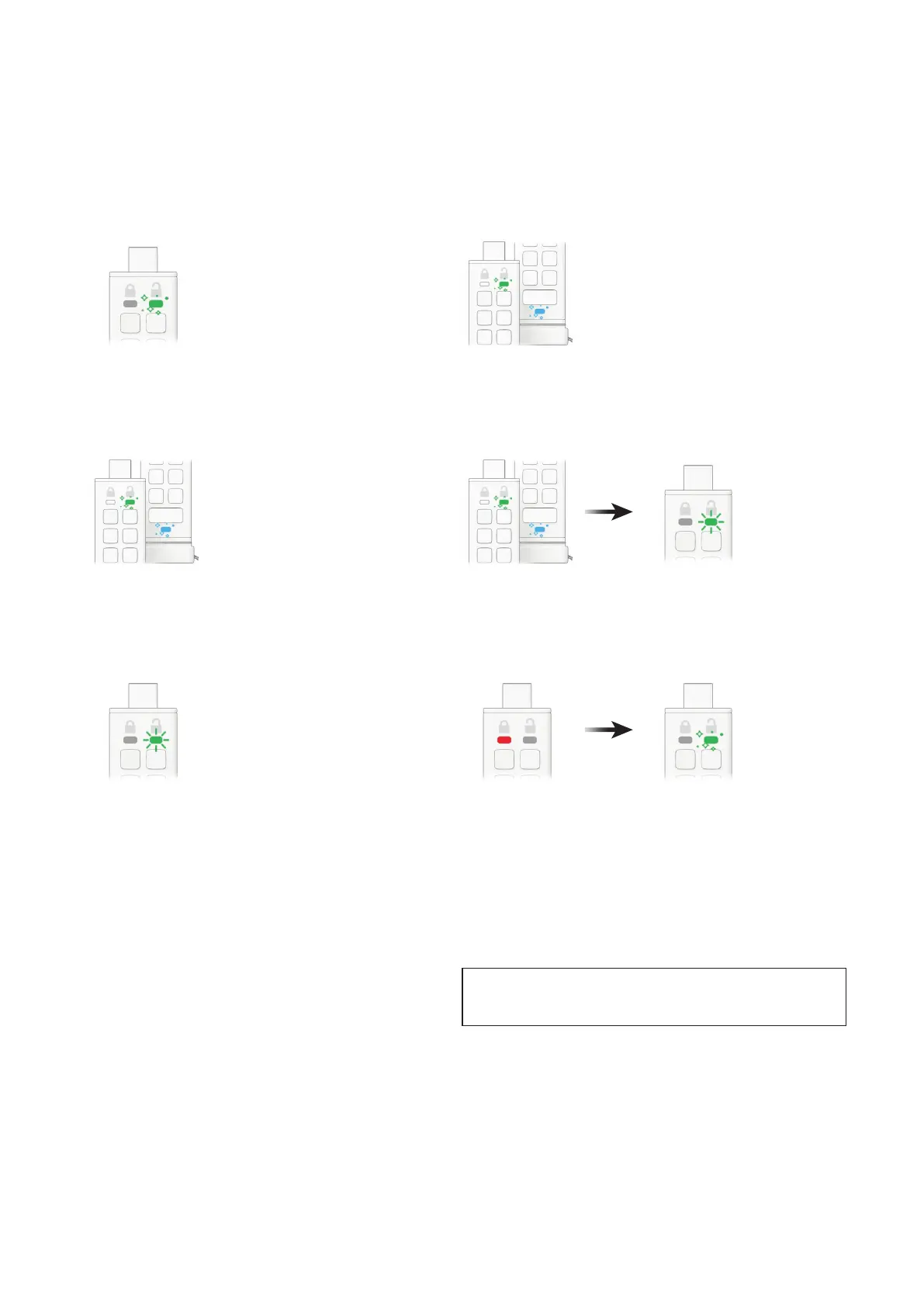
1. Unlock the datAshur PRO
+
C with your Admin PIN
GREEN LED will icker indicating successful Admin PIN entry.
2. Press the KEY button THREE times (triple-click)
GREEN and BLUE LEDs icker together.
4. Press the KEY button once
GREEN and BLUE LEDs will switch to a blinking GREEN LED.
6. Press the KEY button once
Solid RED LED will switch to a ickering GREEN LED indicating the Auto-
Lock time out has been successfully disabled.
3. Press button number 8 followed by the number 5 button (85)
GREEN and BLUE LEDs continue to icker together.
5. To disable the Timeout Lock, press button number 0
GREEN LED continues to blink.
22. How to delete all data in Admin mode
All Admin settings will remain on the datAshur PRO
+
C
but all data will be deleted and cannot be retrieved
and the datAshur PRO
+
C will have to be reformatted
(see sections 28, 29 or 30).
Caution: Entering the Admin PIN to access a locked drive will
clear (delete) the User PIN.
To delete all data stored on the datAshur PRO
+
C,
please follow the instructions below.















 To Next Page