iStorage datAshur® PRO
+
C
User Manual v1.0
10
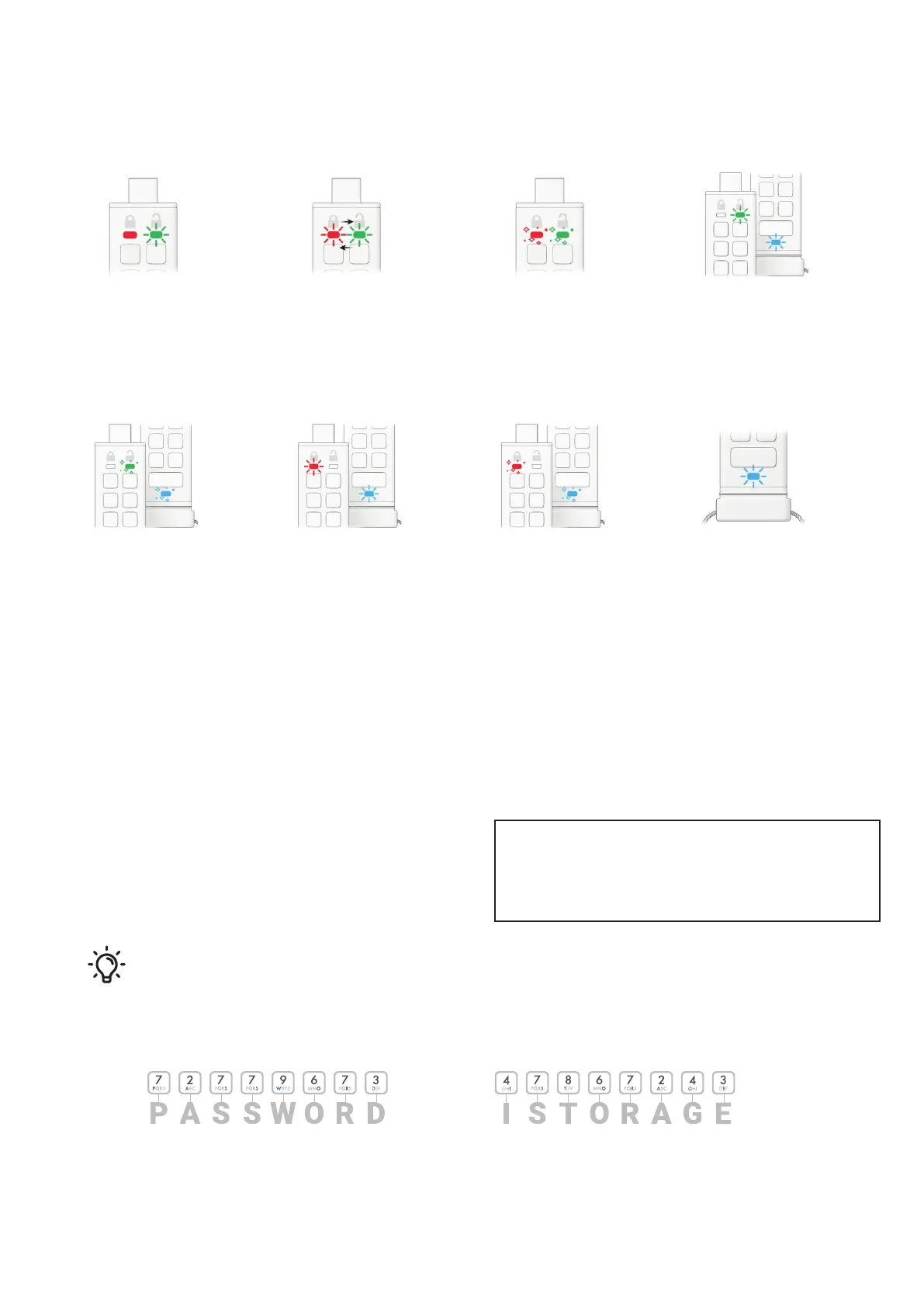
Solid RED and
blinking GREEN
Reset Drive awaiting User
PIN conguration.
RED and GREEN
blinking alternately
Factory reset/deleting les in
Admin mode
GREEN and BLUE
blinking together
User settings mode.
RED and GREEN
ickering together
Awaiting Admin PIN entry.
GREEN and BLUE
ickering together
Admin settings mode.
RED and BLUE
ickering together
Awaiting Admin PIN change.
RED and BLUE
blinking together
When not connected to a USB port
indicates that both User and Admin
PINs have been set on the
datAshur PRO
+
C.
Blinking BLUE
Awaiting User PIN change.
3. How to use the datAshur PRO
+
C for the rst time
datAshur PRO
+
C is supplied in the ‘Initial Shipment State’ with
no pre-set PIN. An 8-15 digit User PIN must be congured
before the drive can be used. Once a User PIN has been
successfully congured, it will then not be possible to revert
the drive back to the ‘Initial Shipment State’.
For “PASSWORD” you would press:
Using this method, long and easy to remember PIN’s can be created.
For “ISTORAGE” you would press:
Password Tip:
You can create a memorable word, name, phrase or any other Alphanumerical PIN combination by
simply pressing the key with the corresponding letters on it.
Examples of these types of Alphanumerical PINs are:
PIN Requirements:
• Must be between 8-15 digits in length
• Must not contain only repetitive numbers, e.g. (3-3-3-3-3-3-3-3)
• Must not contain only consecutive numbers, e.g. (1-2-3-4-5-6-7-8),
(7-8-9-0-1-2-3-4)















 To Next Page