Digital Network Public Address & Voice Alarm System
When the distribution zone in each group is 0, users need to configure function parameters in the【group
configuration】before using. (detailed configuration, refer to【group configuration】
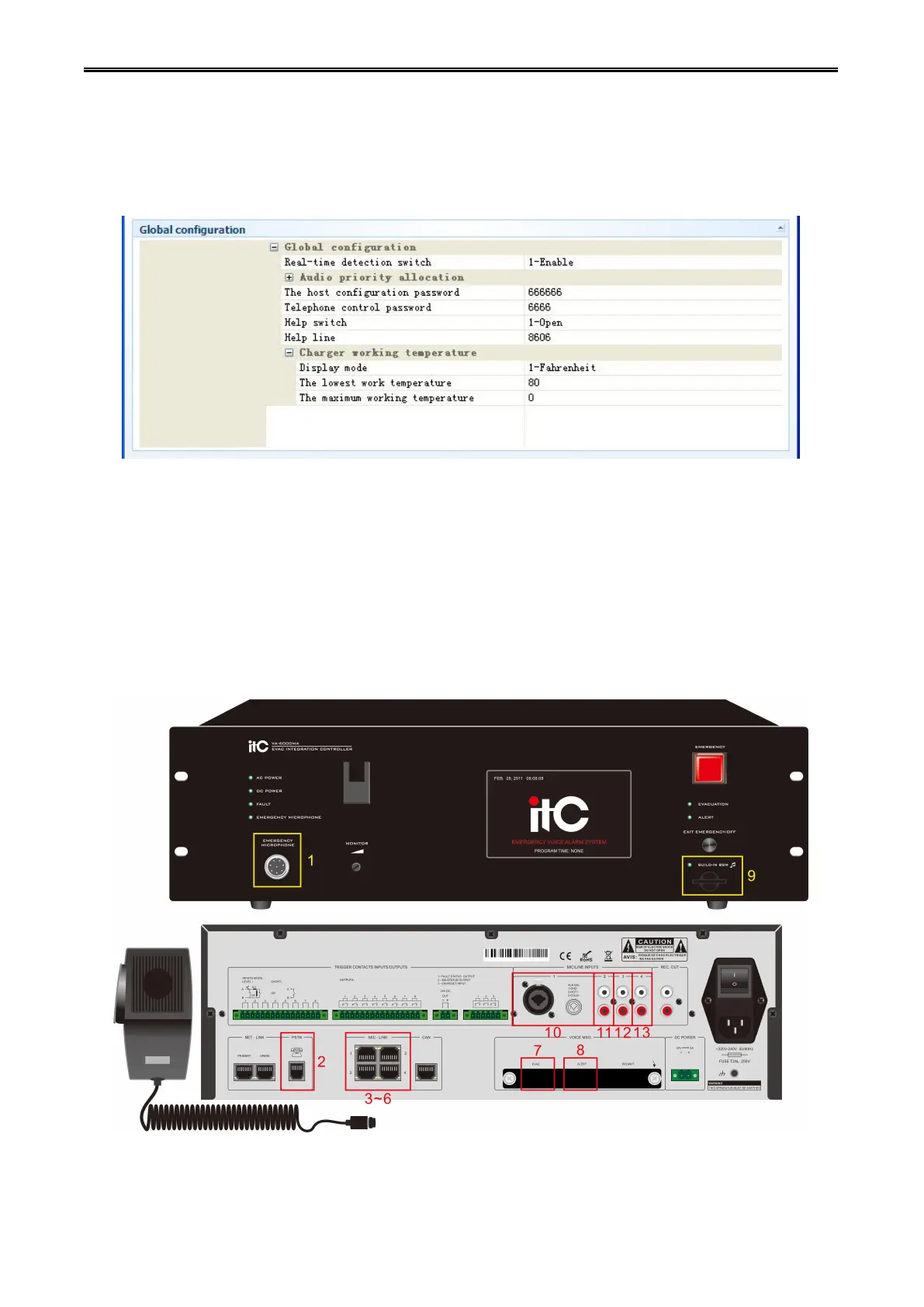
Step 3: Configure the system global parameters, click the "system global parameters configuration" tag,
as shown in the figure below:
1) Monitor switch: set up opening and closing of the system real-time detection switch (The system host
detection switch is uncontrolled).
2) Audio priority: host related audio priority configuration. Click on "+" which in front of the "audio priority
configuration", then "audio priority configuration" drop-down menu would be pop-up, Users can change
the number behind audio to adjust the priority level of the audio. Each host priority is specified by the
Numbers from 0 to 25. Serial number 0 means that the highest priority, serial number 25 means the
lowest priority. The corresponding relation of audios shown in the "Audio priority configuration " and the
host audio is as followings:
1:PTT,2:PSTN, 3~6:MIC1~MIC4,7:EVAC,8:ALERT,9:BGM,10:LINE1,11:LINE2,12:LINE3,13:LINE4.


 To Next Page
 Loading...