EditingtheCuelist Cuelists
MonitoringtheCuelist
To see more information about the Cuelist you do this:
1. From the Home window press the Cuelist button on the touchscreen. Stage
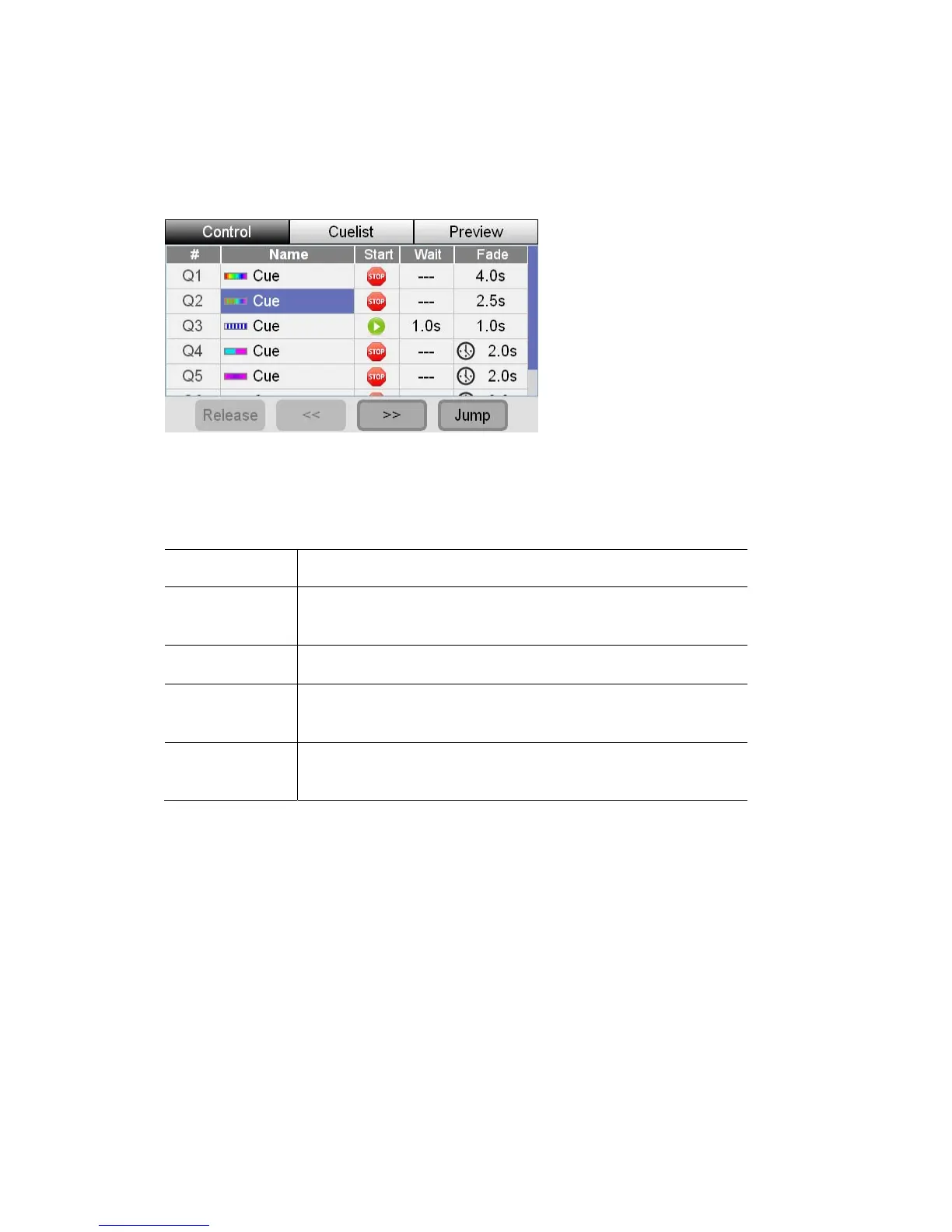
CL displays the Cuelist window with the Control tab selected:
.
This window shows you a list of the Cues, in the Cuelist, and their settings.
ue name to select it and then use the buttons at the bottom
This button… does this…
You can touch on a C
of this window to control the Cuelist playback.
Re
es the Cuelist. This means the cuelist stops playing
and is reset to Cue 1
lease
Releas
<< (Skip Back) Plays the previous Cue – without any fade time.
>> (Skip
Forward)
Plays the next Cue – without any fade time.
Jump
Crossfades to the selected Cue in the fade time of the
stination Cue.
de
 For more detail on the information shown for each cue see the next section.
1. ess the Cuelist button on the touchscreen. Stage CL
displays the Cuelist window with the Control tab selected.
2. touchscreen or touch the Cuelist tab to
open the Cuelist window.
EditingtheCuelist
To edit the Cues in the Cuelist or view their settings you do this:
From the Home screen pr
Press the middle button above the
8‐8 StageCLUserGuide,Version1.3



 To Next Page