Page 22 = Key 1 = Key 2 = Key 3= Maximum or consumption = Minimum or supply.
Calling up additional information
Additional information can be called up for the most
indicated measured values:
Date and time for the highest and lowest values.
Averaging times for the mean values.
Duration of energy determination.
Using key 3 you scroll
to the measured value
indication of the real
power.
Mean values
For each measured value, except work, a mean value is
calculated. The averaging time is programmable. Only
mean values can be marked for storage within the ring
buffer.
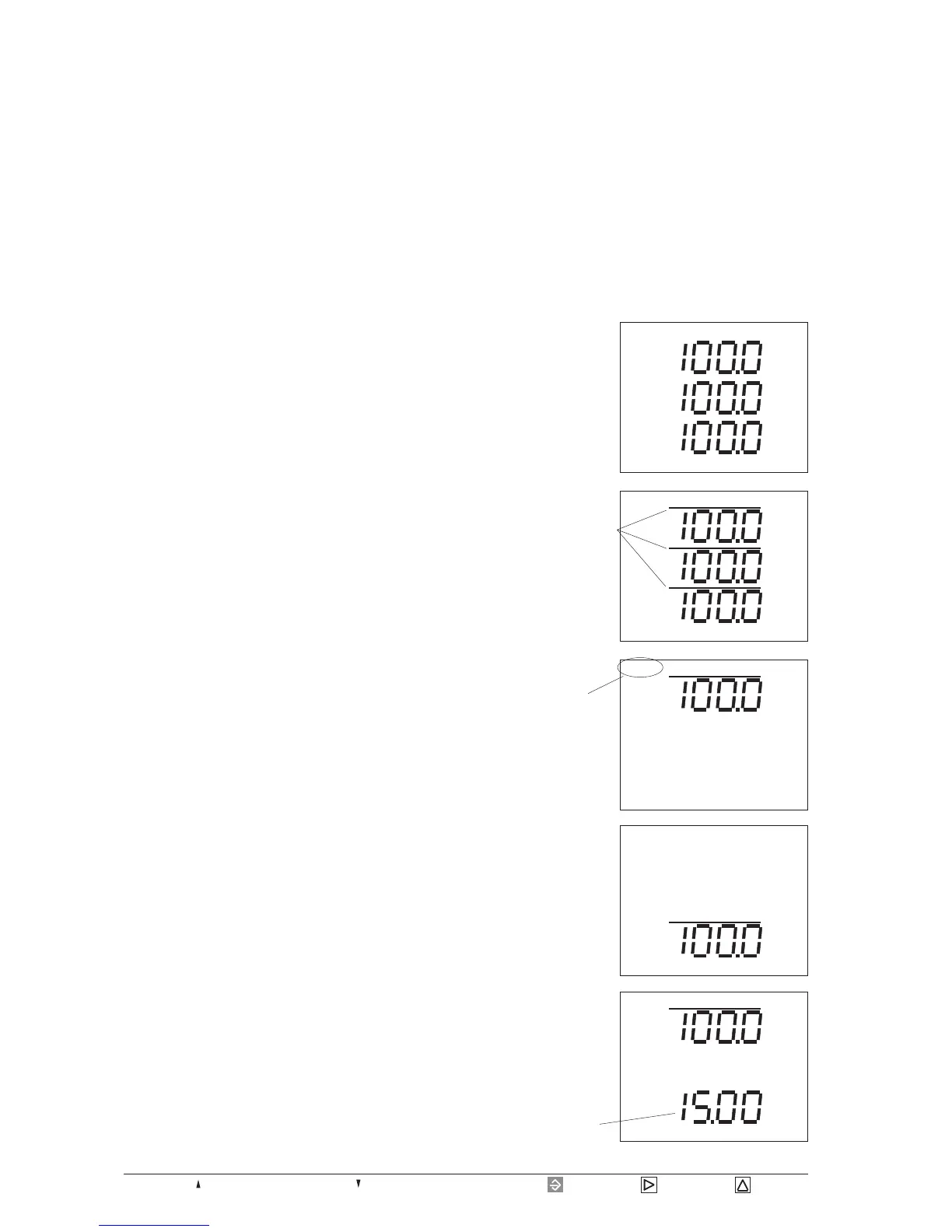
The calling up - in the example for the power maximum
value in phase L3 - is carried out as follows:
Press key 1 for about 2 seconds and return to the first
measured value window of the measured value indicati-
on from each program part.
Pressing key 2 you
scroll to the mean va-
lues of real power.
kW
kW
kW
L3
L1
L2
Select the SELECT
mode using key 1.
The symbol SELECT
is flashing.
Confirm with key 2.
The symbol SELECT
is on.
kW
L3
SELECT
kW
kW
kW
L3
L1
L2
kW
L1
SELECT
Select the mean value
of the real power in L3
using key 1.
Call up the averaging
time for the real power
in phase L3 as an addi-
tional information
using key 2.
kW
M.S
L3
SELECT
Averaging time = 15
Minutes










 To Next Page