Page 40 = Key 1 = Key 2 = Key 3= Maximum or consumption = Minimum or supply.
Modem
Via the RS232 interface, the UMG503 can be connected
to an external analogue modem. The connection between
UMG503 and the Modem is carried out via a "point to
point" cable.
For modem operation, the transmission protocol 5
(modem) must be selected for the RS232 interface.
Transmission protocol RS485
The following protocols can be selected:
off no protocol, interface disconnected
1 Standard Protocol
2 Modbus Protocol
3-
4 Service Protocol
5 PROFIBUS DP (Slave), (Option)
6 Modbus RTU (Master)
*1)
Terminal resistance
If the device is connected to the end of a bus cable, the
bus cable must be terminated by terminal resistances.
The required terminal resistances are integrated within
the device and are activated in condition ON.
RS232 interface (Option)
The RS232 interface is suited for transmission of data
over a distance of 15m. The UMG 503 can be connected
directly via this interface to the COM-port of PC or an
external analogue modem.
The connection to PC must be carried out via a
zero
modem cable.
Transmission protocols RS232
off no protocol, interface disconnected
1 Standard protocol
2 Modbus RTU protocol
3-
4 Service protocol
5 Modem
6 Modbus RTU (Master)
*1)
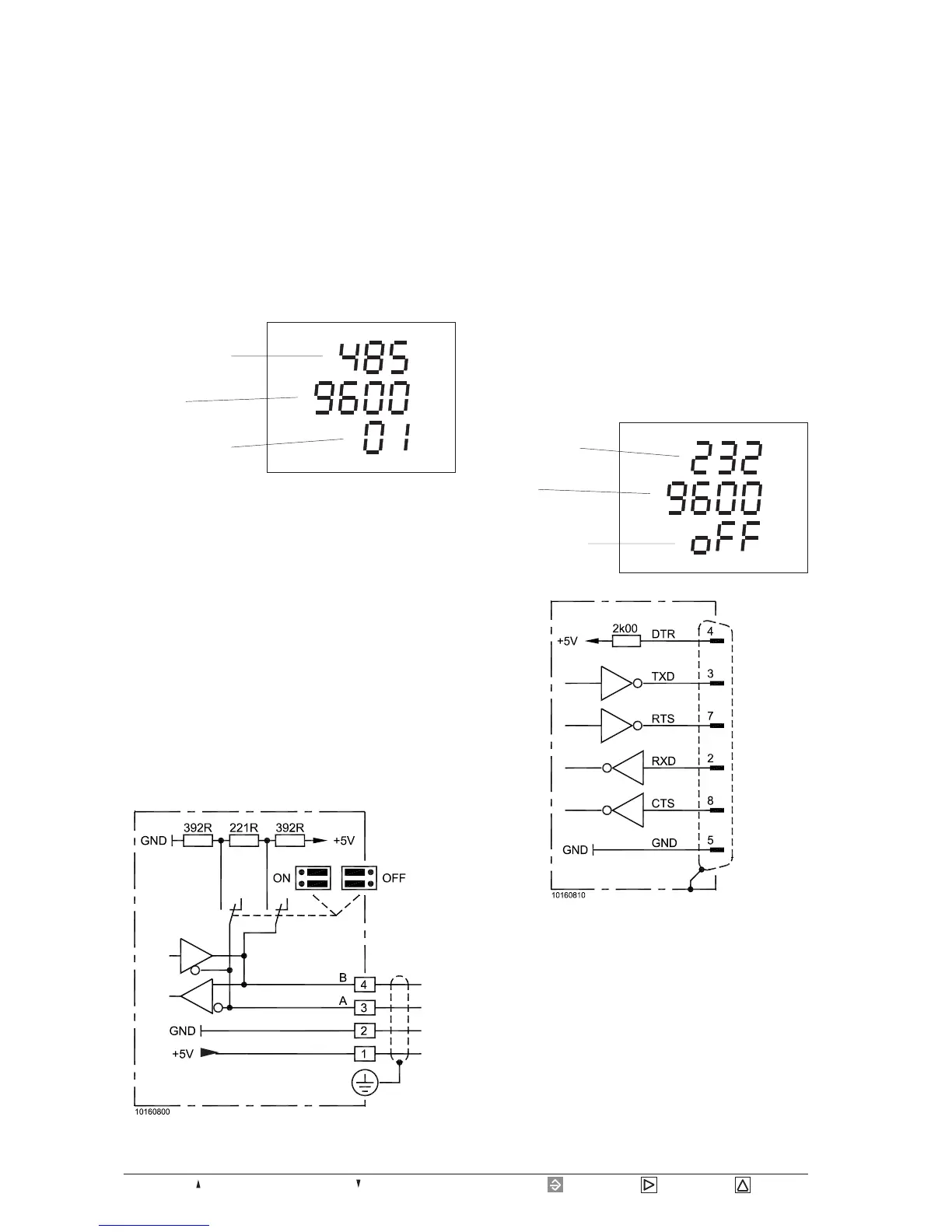
CONF
Type of interface
Protocol number
Baud rate
RS485 interface (Option)
The RS485 interface is suited for transmission of data
over a distance of 1200 m. Up to 31 UMG503 and a
master (PC or SPS) can be connected.
As PCs usually only have a RS232 interface, a suitable
interface converter must be connected between UMG
503 and PC. The distance between interface converter
and PC may be 4 m at maximum. The distance between
UMG 503 and interface converter may be 1200 m at
maximum.
Type of interface
Protocol number
Baud rate
CONF
*1)
The protocol 6 can run on one interface RS232 or RS485 only.
Diagr. Connection diagram RS485
Diagr. Connection diagram RS232
UMG503
UMG503








 To Next Page