Page 30 = Key 1 = Key 2 = Key 3= Maximum or consumption = Minimum or supply.
Delete min. and max. values separately
If you are in the menu PRG and you would like to delete
the highest voltage values only, please proceed as follows:
V
V
L3
L1
L2
V
PRG
V
L2
PRG
EDIT
V
L1
PRGEDIT
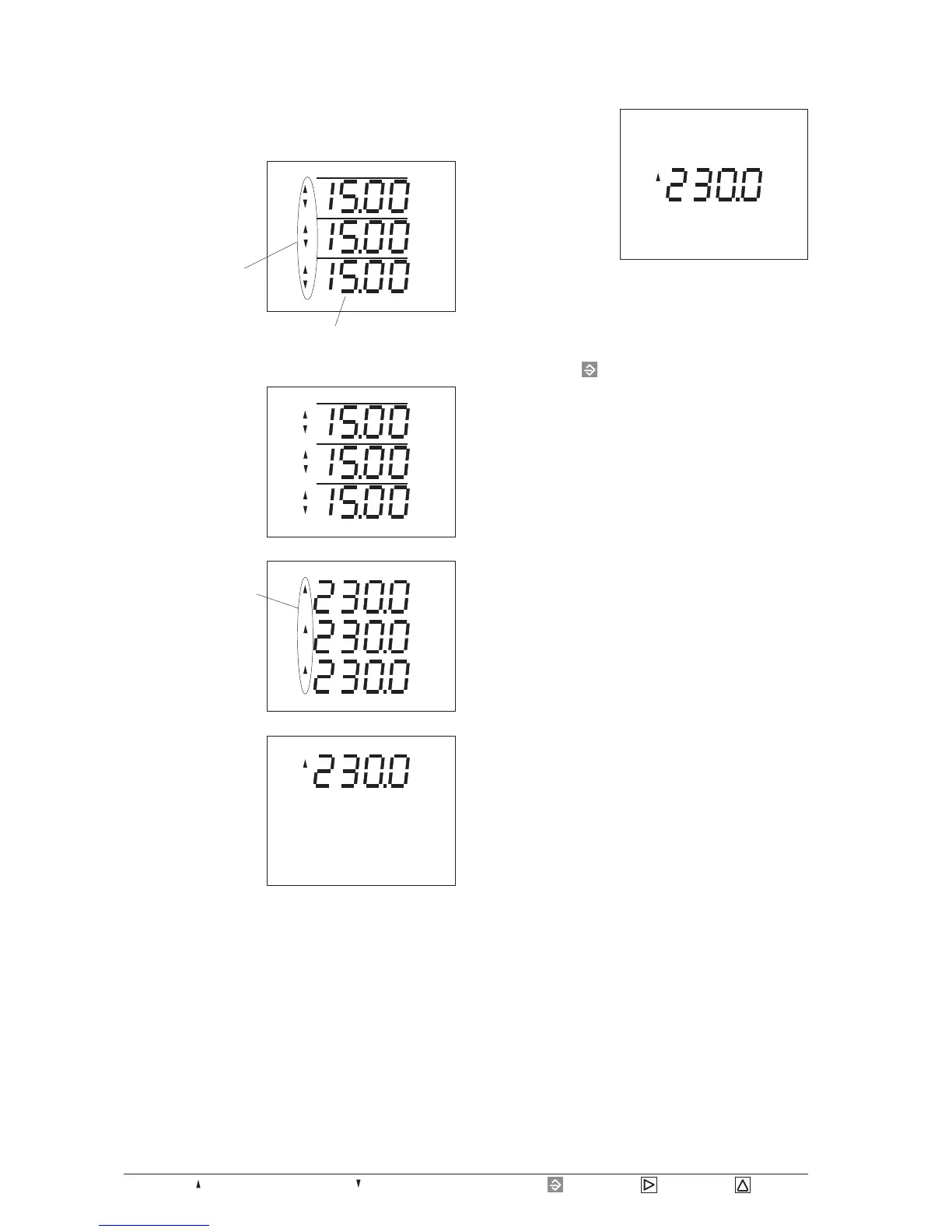
Pressing key 1, the
highest value in phase
L1 is indicated.
The text EDIT appears.
Now scroll to the
highest values of
voltage using key 2.
Pressing key 1 again, the
highest value in phase
L2 is indicated.
If this highest value
should be deleted, ple-
ase press key 3.
The indicated value is
set to 000.0 for a short
duration and is over-
written by the next
measured value.
Pressing the key for about 2 seconds, you leave the
PRG menu and return to the first measured value window
of the measured value indication!
Change to the measu-
red value indication
using key 3. In this
example the program-
ming of the current in
the three phases is
shown.
All three currents are
programmed for the
ring buffer.
Now scroll to the
measured value indica-
tion of the voltages by
using key 3.
A
A
A
L3
L1
L2
PRG
V
V
V
L3
L1
L2
PRG
Averaging time =15 Minutes








 To Next Page