7 Profile program editor
38
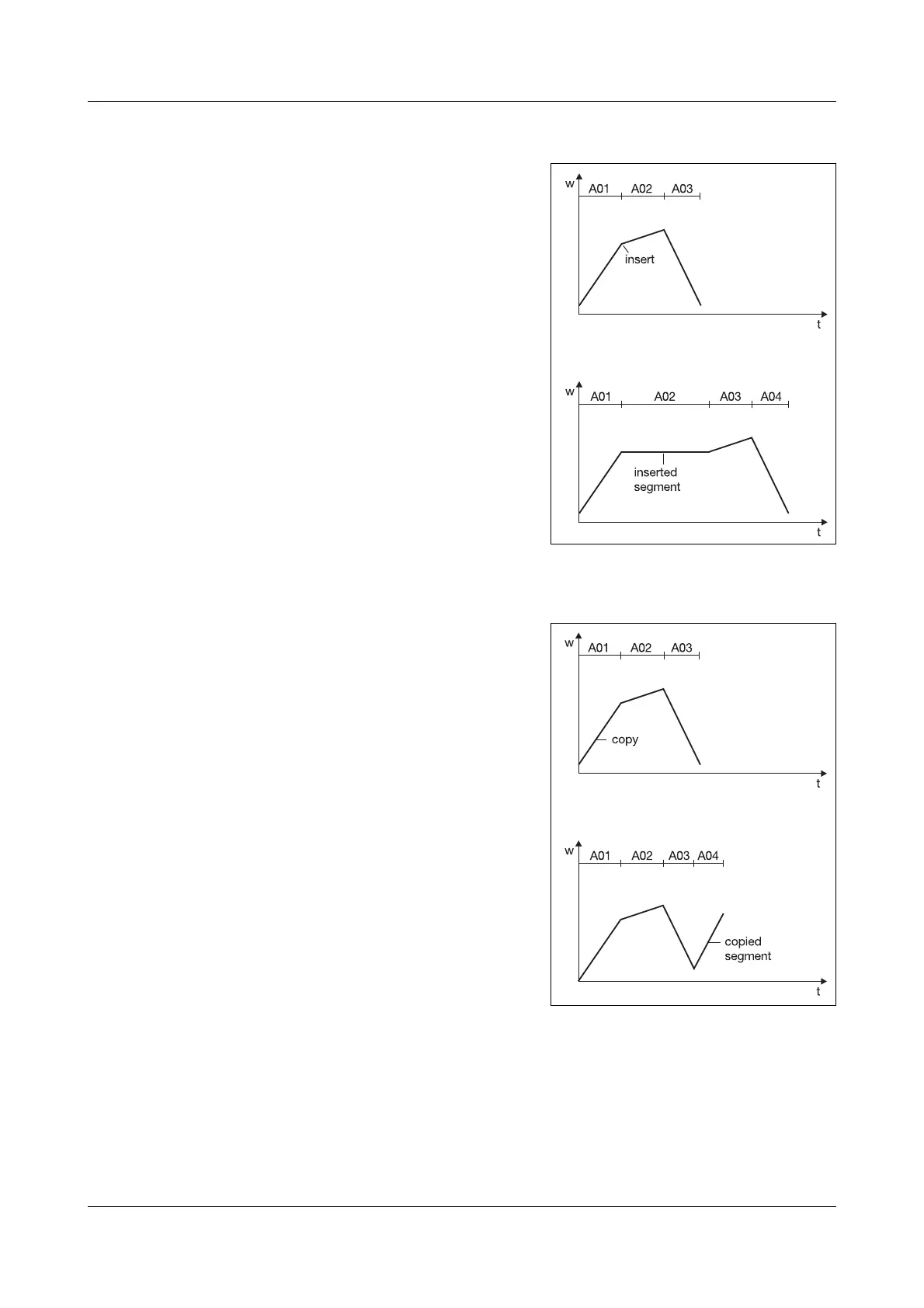
7.3 Inserting segments
Segments can be inserted at any point
in the profile. The subsequent segments
will be automatically rearranged and re-
numbered. The parameters of the seg-
ment that was inserted (A02 in the ex-
ample) are preconfigured to standard
default values.
h Select “Insert segment”
h Continue with
E
h Enter the segment number
(in this case: 2)
h Continue with
E
h Enter parameters
(at least setpoint and segment
time/gradient)
h Back with
X
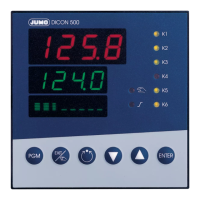
7.4 Copying segments
Segments which have already been de-
fined can be copied to other segments,
or can be added to a series of defined
segments.
h Select “Copy segment”
h Continue with
E
h Enter the segment number of the
segment to be copied
(in this case: 1)
h Continue with
E
h Enter the segment number of that
segment to which the data to be
copied should be assigned
(in this case:4)
h Confirm with E


 To Next Page