41
8 Operating level
General At the operating level, it is possible to display and modify additional setpoints,
indicate different process variables and program parameters and set the cur-
rent system state.
Access level
by ...
h pressing
P 3x in the basic status or the manual operating mode.
OPERATNG
Parameter Value/selection Description
Setpoints
Setpoint 1
Setpoint 2
Setpoint 3
Setpoint 4
➔ SETPNTS
➔ W1
➔ W2
➔ W3
➔ W4
0.
0.
0.
0.
Value input
within the defined setpoint limits
w1 has no significance
Process variables
Analogue input 1
Analogue input 2
Analogue input 3
Analogue input 4
Mathematics 1
Mathematics 2
Output
➔ PROCESS
➔ ANALOG 1
➔ ANALOG 2
➔ ANALOG 3
➔ ANALOG 4
➔ MATHS 1
➔ MATHS 2
➔ OUTPUT
0.
0.
0.
0.
0.
0.
0.
Value display
System state
Setpoint
Operating contact 1
...
Operating contact 8
➔ SYSSTATE
➔ SETPOINT
➔ OPCNTCT1
...
➔ OPCNTCT8
0.
OFF
...
OFF
Value range as for setpoint limits
Off
On
Settings are only valid for the
current operating mode (basic
status or manual mode)
Parameter set
number
➔ PARA.SET 1 Value inputs
1 —2
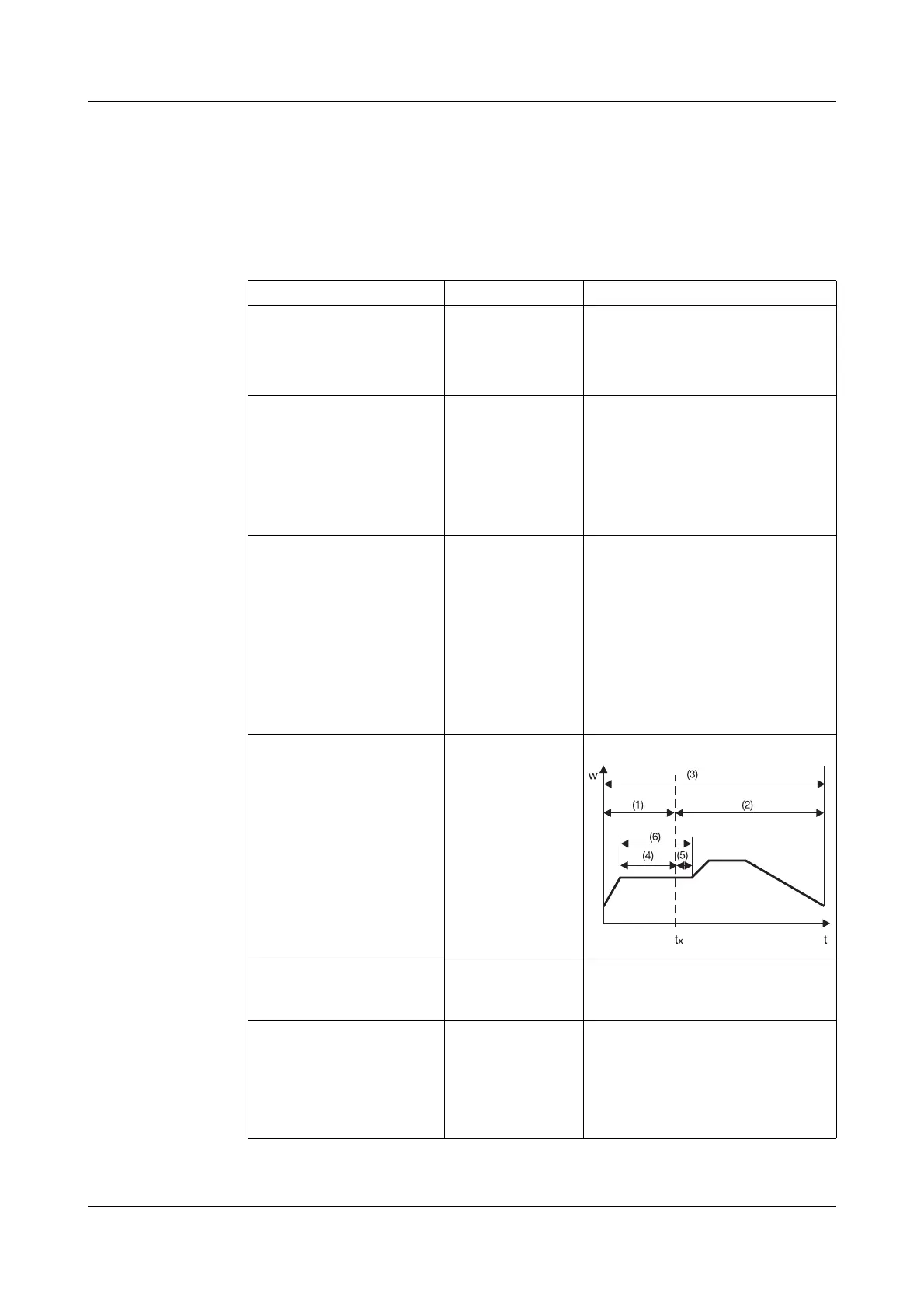
Program times
Program run-time (1)
Residual program
run-time (2)
Max. program
run-time (3)
Segment run-time (4)
Residual segment
run-time (5)
Max. segment
run-time (6)
➔ PGM TIME
➔ P RUN-T
➔ P RES.T
➔ P MAX.T
➔ S RUN-T
➔ S RES.T
➔ S MAX.T
00:00:00
00:00:00
00:00:00
00:00:00
00:00:00
00:00:00
Value display
Free segments ➔ FREE SEG 100.
Value display
Number of program segments
which are still free
Real-time clock
Function
Time
Date
➔ CLOCK
➔ FUNCTION
➔ TIME
➔ DATE
ACTIVE
00:00:00
26.01.99
inactive
active
00:00:00 — 23:59:59
Format: DD.MM.YY
Factory settings are shown bold.



 To Next Page