Instructions for use ELECTROmatic TM and TMM/TMC
3 Description of the product | 3.4 Motor tubing
22 / 90
3.4 Motor tubing
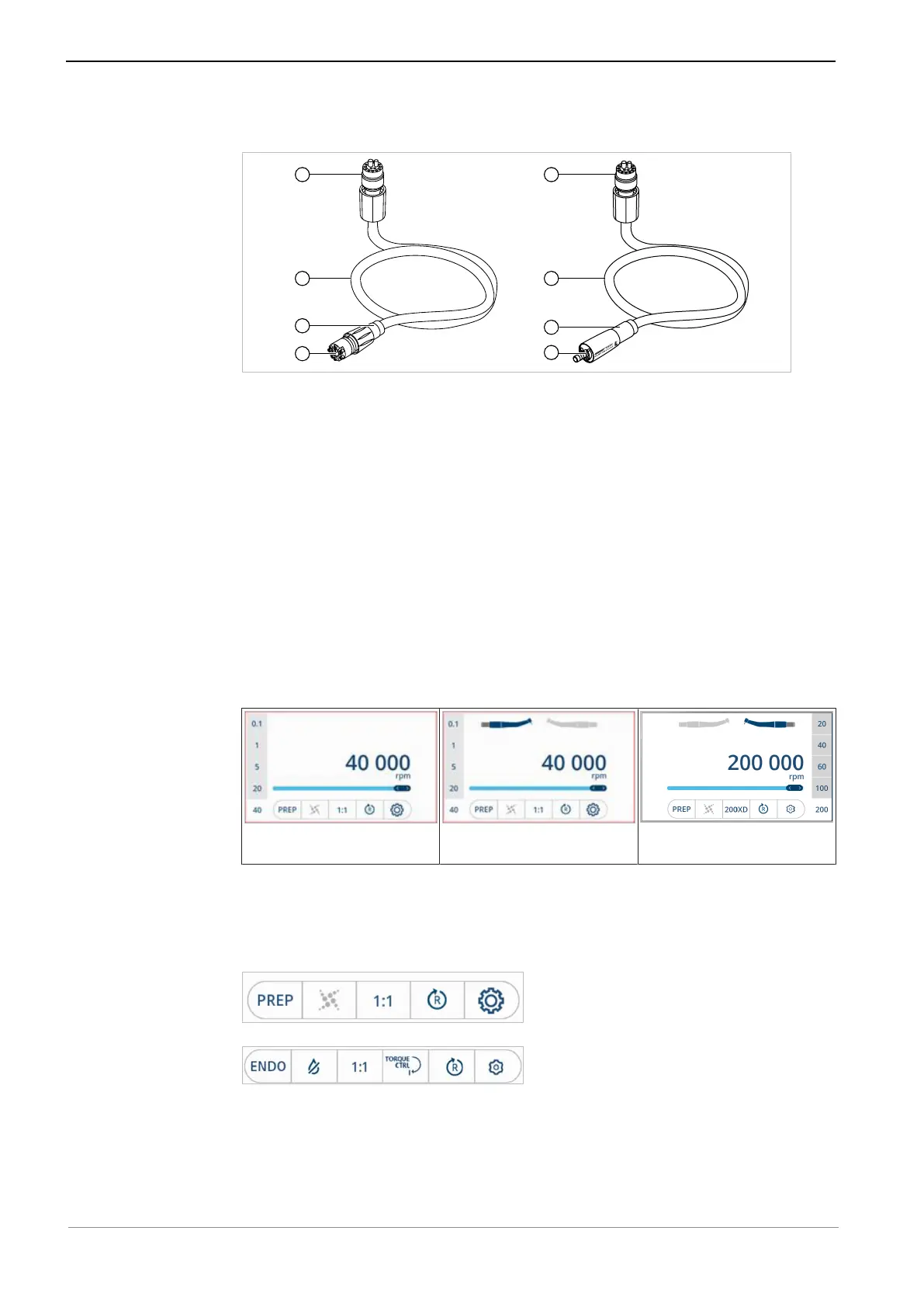
KL motor hose/COMFORTbase
① Connection ELECTROmatic ④ Connection for motor
② KL motor hose 1750/2200 /
COMFORTbase 1750/2200
⑤ Connection for COMFORTdrive
③ Spray control
3.5 Control panel
The control panel has a touch display. The touch display shows different con-
tents depending on the product version and the selected mode. The control ele-
ments on the touch display are either toggle switches or show a selection list
when touched.
▪ Values/figures shown with a blue background are active
▪ Values/figures shown with a grey background are deactivated
▪ Speed/file shown with a white background is activated/selected
Display ELECTROmatic TM
Display ELECTROmatic TMM/
TMC
Display ELECTROmatic TMC
(COMFORTdrive is connected
and selected)
Function of the operating keys on the display
Depending on the currently selected mode, PREP mode or ENDO mode, the fol-
lowing control elements are displayed on the lower edge of the display:
Control elements in PREP mode
Control elements in ENDO mode









 To Next Page