41
User Manual EN | v201906
5.6 Operating the moving oor (B control)
Intheeventofmalfunctioningoftheoperation,seeCh7.2
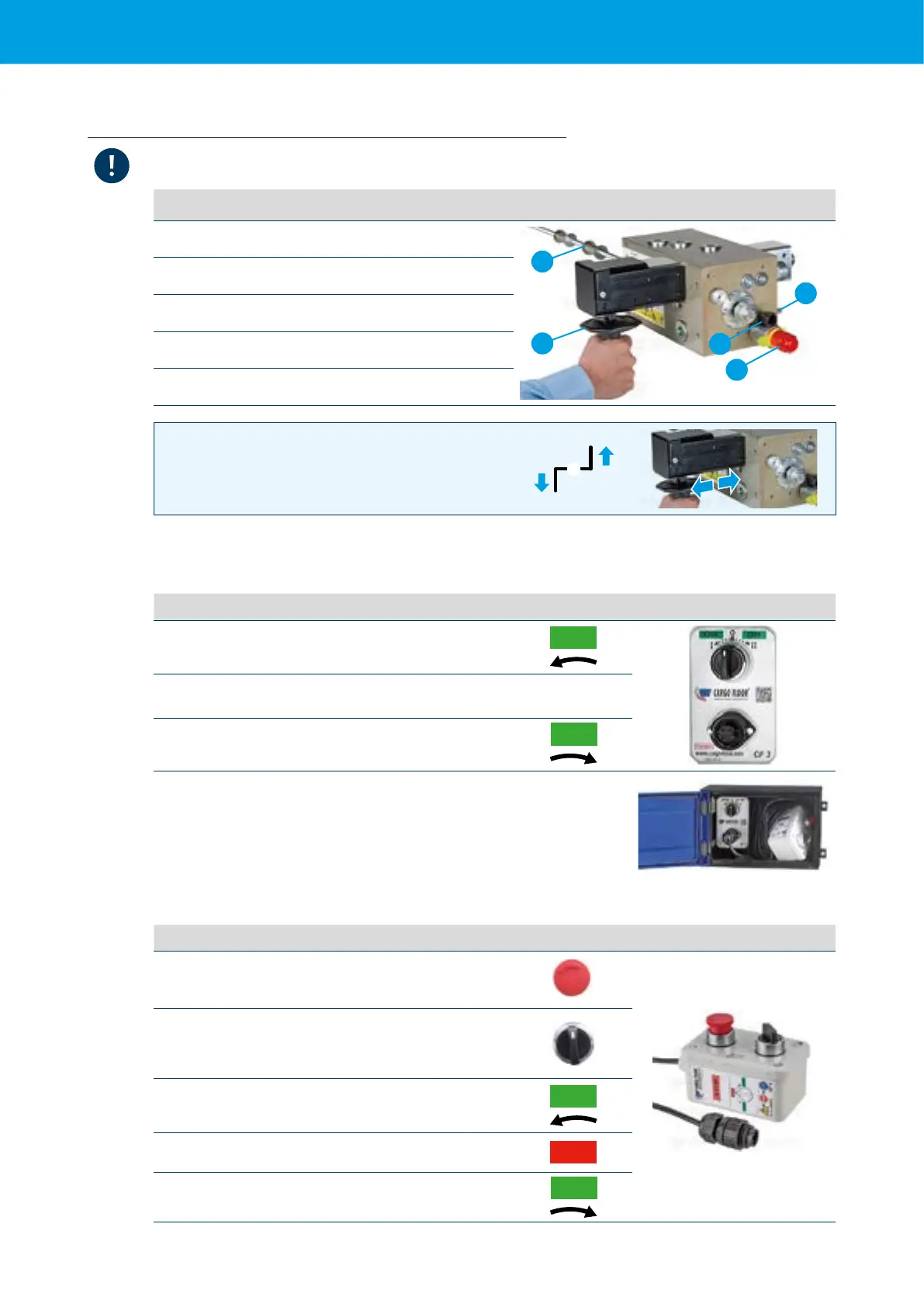
Loading or unloading can be selected using the handle located under the trailer
1 Threaded rod
3
5
2
1
4
2 Operatinghandle:Loading-Unloading
3 Deutsch connector
4 GS02function:on/off
5 Pressure relief valve
1 Handle pushed in,movingoorwillunload
2
1
0
0 Handle in the middle position,movingoorstops
2 Handle pulled out,movingoorwillload
5.6.1 CF3 switch (switch in box on the trailer, see 2.1)
TheCF3isthexedswitchthatismountedinthecontrolboxandisequippedwitha3-positionswitch.
Functions:
I
Fromthispositiontheswitchjumpstothestop
position when you release it.
ON
0
Centre position = 0, the rotary switch automatically
returns to this position when you release it.
II
Fromthispositiontheswitchjumpstothestop
position when you release it.
ON
TopreventanoperationconictingwiththeCF4remotecontrol,theswitchis
equippedwithanautomaticspringreturn.PositionIandII,alwaysjumpsbackto
the "0" position. At the front of the CF3 switch is a connector to which the CF4
switch can be connected. The CF3 switch can be used if the CF4 switch malfunctions
5.6.2 CF4 switch (remote control)
Functions:
Red button: The emergency button. Press to activate and
turn to deactivate the emergency button;
Rotary switch:three-positionrotaryswitch.Byactivating
this, the system will start loading or unloading (depending
on the position of the control lever). By deactivating this,
the system will stop.
Load: When released, the switch turns to the stop position
ON
Centre position
STOP
Unload: Where the switch remains in the position(locking).
ON



 To Next Page