3. Manual setup
3.2. Setting the tempeature and automatic pre-heating
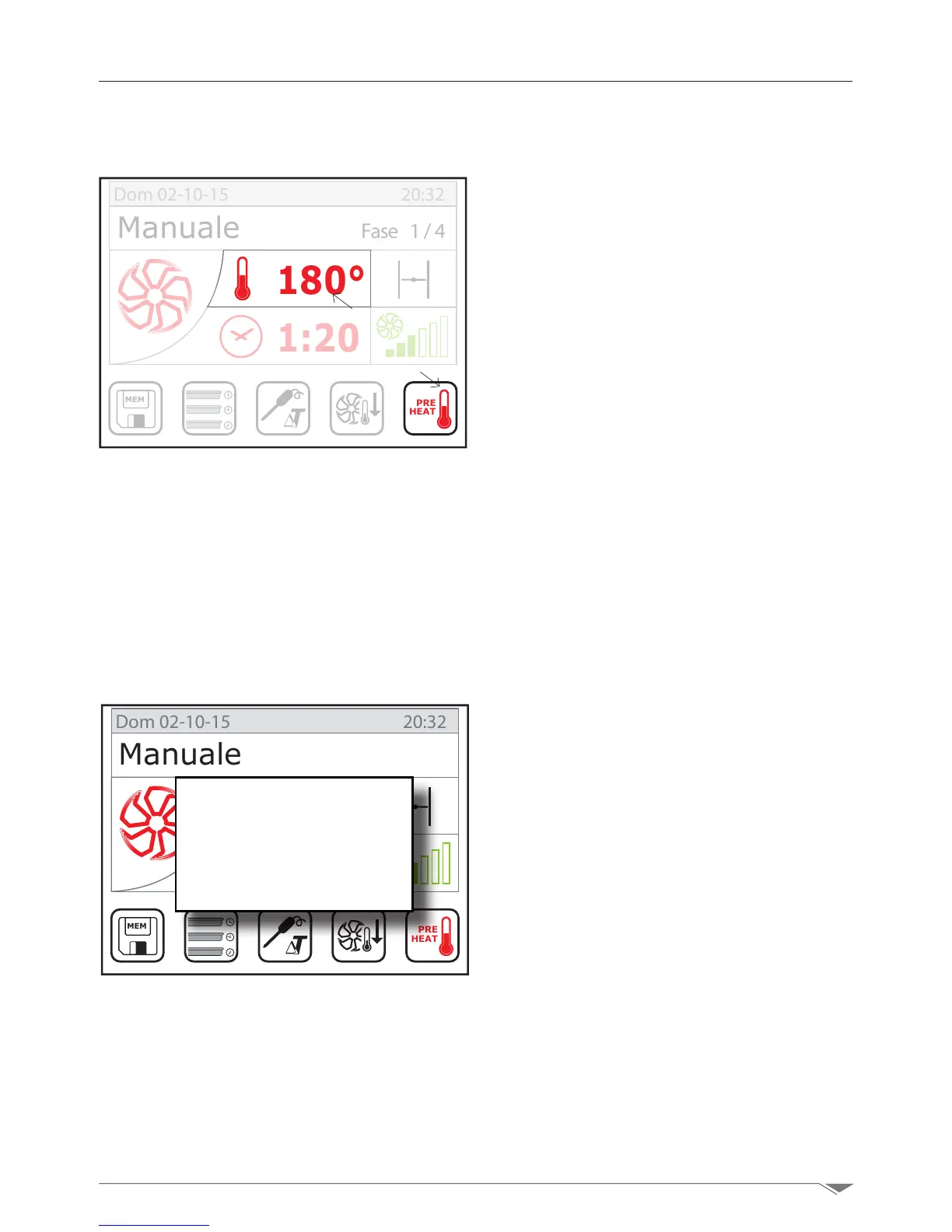
Select on display the temperature setup
(S2 - g. 17)andchoosethetemperature
turning the dial M clockwise to increase the
temperature or counterclockwise the de-
crease it.
Conrmbypressingthe dialM or the dis-
play S2.
Automatic pre-heating of the oven
Once you have set the cooking temperature,
the pre-heating function of the oven can be
selected by pressing the key S10 (g. 17).
Pre-heating is active if the icon S10 is red.
The oven automatically determines the pre-
heating temperature, bringing the oven to
a temperature 22% higher than that
set for cooking.
When the pre-heating temperature is
reached, the oven generates an acoustic
signal and on display appears the pop-up
window (g. 17).
i IMPORTANT!
During the automatic pre-heating phase
the oven should be empty. Wait for the
pre-heating cycle to complete and than
load the oven.
MEM
PRE
HEAT
180°
1:20
Manuale Fase 1/4
Dom 02-10-15 20:32
g. 17
S2
S10
g. 18
MEM
PRE
HEAT
180°
1:20
Manuale Fase 1/4
Dom 02-10-15 20:32
Pre-heating
Pre-heating
OK!



 To Next Page