76
Measurement
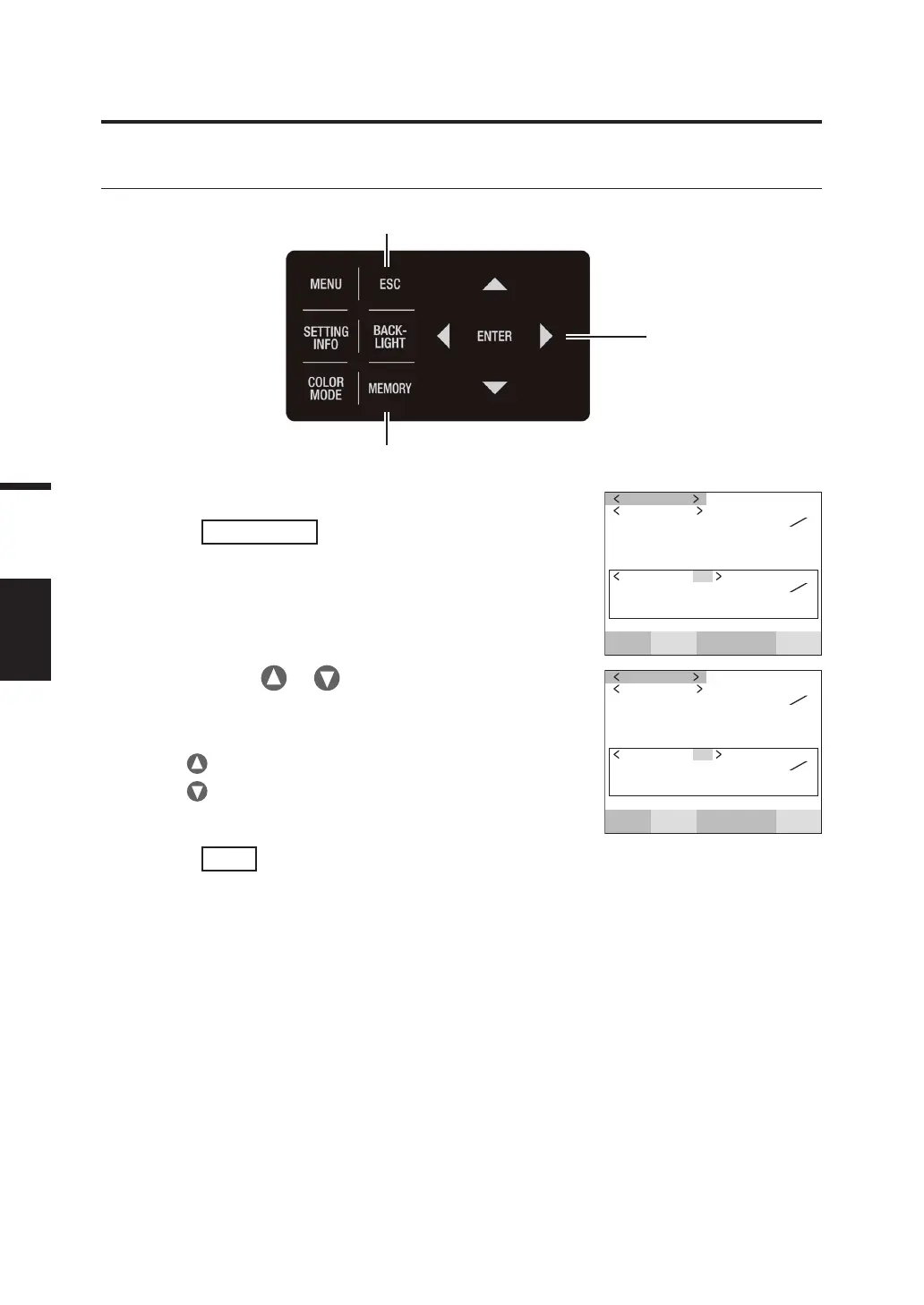
Confirming Memory Data
Operating Procedure
1.
When the MEAS screen is displayed,
press
MEMORY
key to switch to the
MEMORY screen.
The MEMORY (Measurement Value) screen appears
on the LCD.
The memory data number 00 is displayed.
SPD
CMF
SYN
[
Hz
]
ACC
Lv 7.285
x 0.1700
y 0.0938
MEASURE
Lv 54.22
x 0.4045
y 0.4073
MEMORY 00
cd
m
2
cd
m
2
2
. Press either or key to confirm the
measurement value stored at the number
of memory data.
Press key for a larger number.
Press
key for a smaller number.
SPD
CMF
SYN
[
Hz
]
ACC
Lv 54.22
x 0.4045
y 0.4073
MEASURE
Lv 54.22
x 0.4045
y 0.4073
MEMORY 10
cd
m
2
cd
m
2
3.
Press
ESC
key.
The MEAS screen appears again on the LCD.
3
1
2
Follow the procedure below to confirm the saved measurement values.



 To Next Page
 Loading...









