10
4. The meter/counter screen
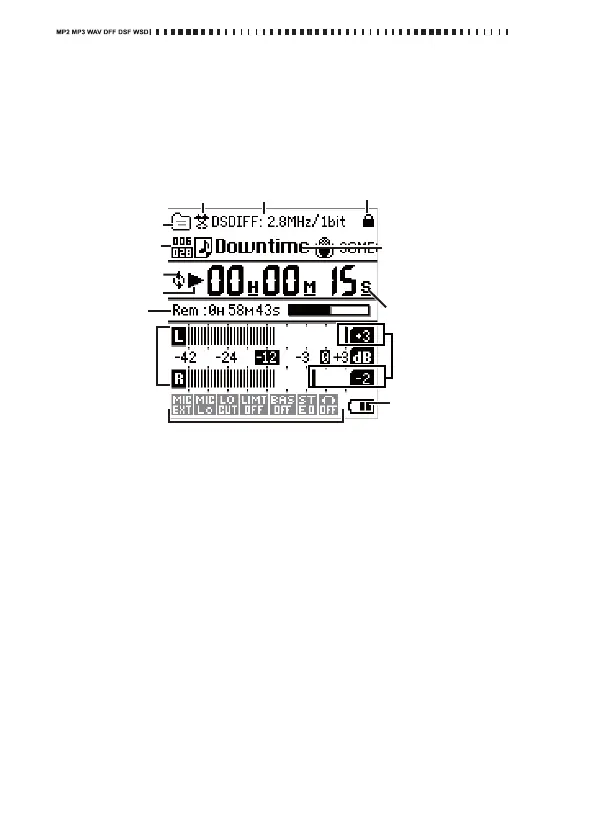
Whenyouturnonthepower,themeter/counterscreenisshowninthe
display.Whenthemenulist(MENU)screenisshown,youcanalsoaccess
themeter/counterscreenbypressingthemenubutton.
ThisscreenshowsinformationsuchastheMR‐2’soperatingstatusand
recording/playbackformat.
Project/file format
Thisshowstheformatofthecurrentproject/file(seepage17).
What is a project?
WhenyourecordontheMR‐2,twofilesarecreated;anaudiofileanda
projectfile(containingprotectiondataandmarkers,etc.).Thesetwo
filesarecollectivelycalleda“project,”andcanbeoperatedontheMR‐
2asifthe
ywe
reasingleaudiofile(referto“Memorycardstructure
andfiles”onpage47).
Shuffle indicator
Thisiconappearswhenyouselectshuffleplayback.Theiconwillnotbe
visibleifshuffleplaybackisnotselected(seepage35).
Playback mode indicator
Thisiconindicatescurrentplaybackmode(seepage35).
# of files
Thesenumbersindicatethenumberoffilesinthefolder,andthefilenumber.
Remaining battery
charge/USB bus
power indicator
Project/file format
Protect indicator
Recorder status
Counter
Project/
file name
(current
project/file)
Project/file
playback
position
indicator
Peak hold
indicators
Level meters
Playback
mode indicator
Repeat indicator
Recording parameters
Shuffle indicator
# of files



 To Next Page