15
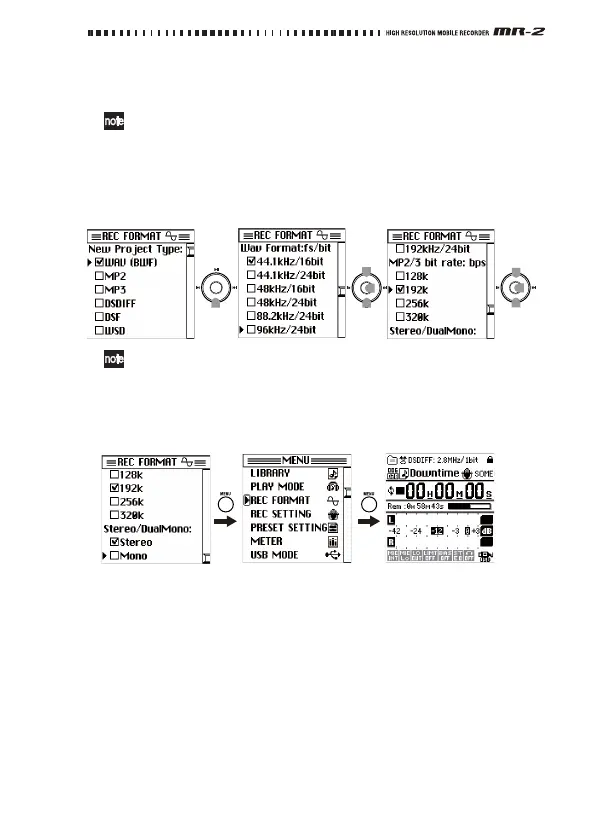
3. IfyoucheckedWAV(BWF),usethecontrollerbuttonstoselectand
confirmthedesiredWavFormat:fs/bitsetting(bitdepthandsampling
frequency),andstereo(Stereo)ormono(DualMono).
Ifyouselected“176.4kHz/24bit”or“192kHz/24bit”forthefs/bit
setting,“Stereo”willautomaticallybeselected.
IfyoucheckedMP2orMP3,usetheco
ntrollerb
uttonstoselectand
confirmthedesiredMP2/3bitrate:bpssetting,andstereo(Stereo)or
mono(Mono).
IfyoucheckedDSDIFF,DSF,orWSD,asamplingfrequencyof
2.8224MHzwithstereowillbespecified.
4. Whenyouhavefinishedsettingtherecordingformat,presstheMENU
buttontoreturntotheme
nulist
screen,andthenpresstheMENUbut‐
tononceagaintoreturntothemeter/counterscreen.
Adjusting the recording input level
Hereishowtoadjusttherecordinglevel.TheMR‐2enablesyoutoadjust
thegainmanually(“Manual”)orautomaticallyaccord ingtotheinput
level(“Auto”).WhentheMR‐2isshippedfromthefactory,thisparameter
issetto“Manual.”Ifyouwanttoadjustthemicrophonesensitivity,set
thelowcutparameter
fortheinputsignal,orselectthe“A u t o ” levelfunc‐
tionandadjustdetailedsettings,referto“Modifyingtherecording
parametersettings”onpage20.
If you've selected WAV or MP2/3
Push
Push
Push



 To Next Page