112
6
© 2018 KOSTAL Solar Electric GmbH
System monitoring
6.1 The Webserver
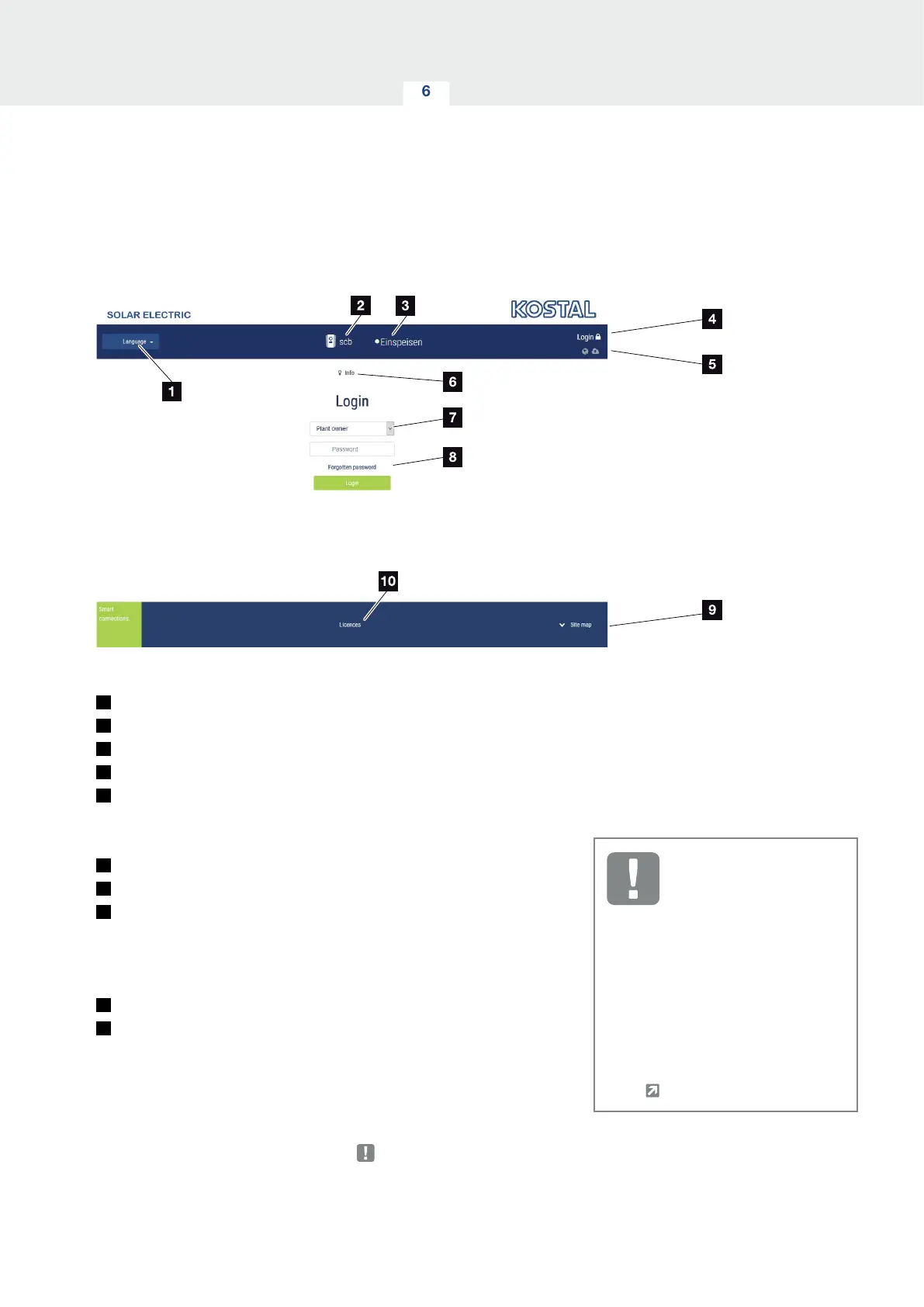
Webserver– Start screen
Fig. 51: Webserver– start screen
1
Language selection
2
Name of the inverter
3
Inverter status message
4
Webserver login/logout
5
Status messages
Globe symbol: Status of solar portal connection
Download symbol: Software update
6
Retrieval of device information
7
Login as plant owner or installer
8
The user can use the “Forgotten password” button to
have a password for the Webserver re-assigned or to
generally create a new web password for logging in
for the first time.
9
Access to sitemap
10
Information about licences
The Webserver forms the graphic interface between the
inverter and user. Even if you don't log in, here you can
find information about your PV system, such as, device
information and the current inverter status. Go to Login
to log in as plant owner or installer.
IMPORTANT
INFORMATION
To log in as a plant owner, you need a
password, which has to be generated
for the first login using “Forgotten
password?”. For this, you also need
the master key from the type plate.
To log in as an installer, you need the
master key from the inverter’s type
plate and your service code, which
can be requested from our service
team.
Ch. 13.2



 To Next Page