Part 1: Operation Changing the settings
11
Changing the settings
The operating flap must be opened first in order to change
or request set values.
=> Controller switches to Operation mode
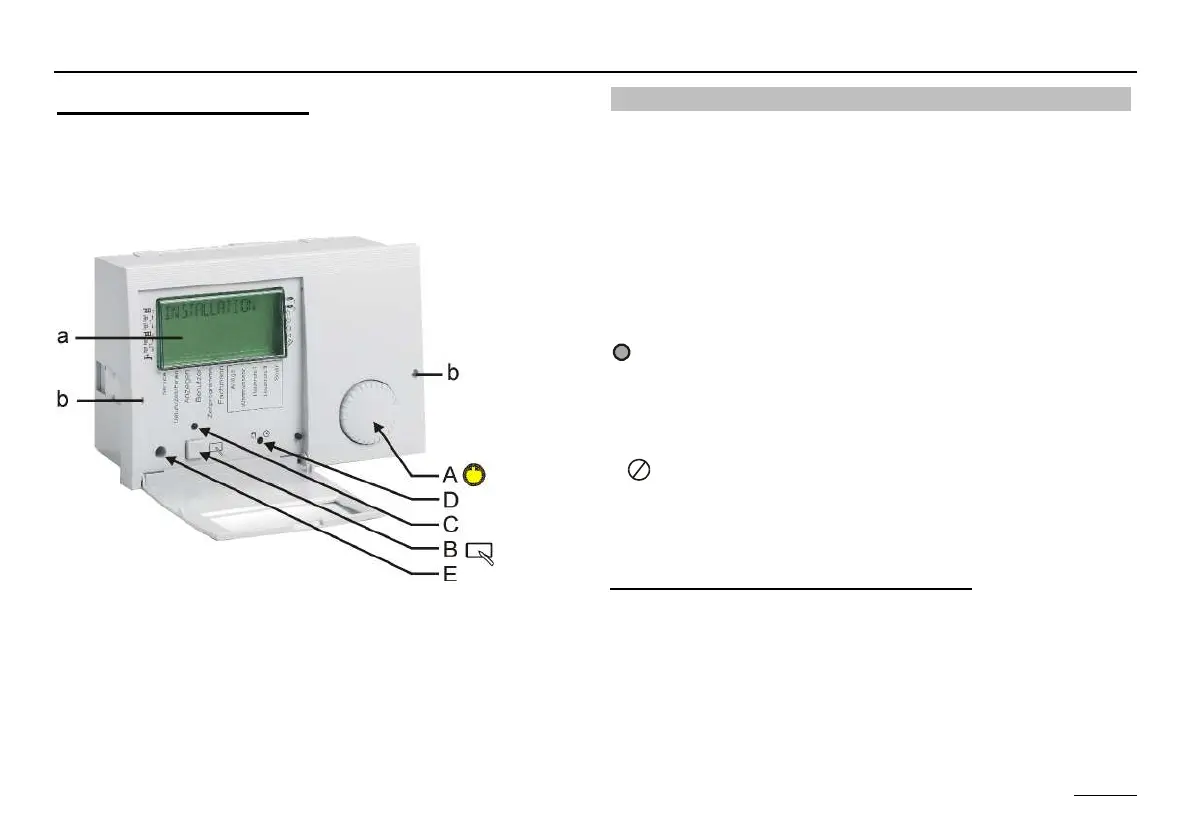
a Display indicating the current level
b Holes to unlock the controller fixation.
Insert a thin screwdriver deep into the holes and
then lift up the controller.
Operating elements
Ç A => Shaft encoder
Search for value/level or adjust value
Ä B => Programming key
Select a value level
Select a value level to change
Save a new value
C => Change display
LED ON => The value in the display can be changed by
actuating the shaft encoder (A).
x
F
D => Manual-Automatic switch.
In Manual mode, all the pumps and first burner stage are
switched on. The mixers are not adjusted / controlled (dis-
play: "EMERG-MODE“).
Limitation (switch-of with 5 K hysteresis):
Burner => MAX T-HS (Expert)
Heating pumps => MAX T-FLOW (expert)
Cylinder charging pump => T-DHW I (user)
E Caution, overheating, e.g. with floor or wall heating! =>
Set mixer by hand!
E => PC connection via optical adapter


 To Next Page