MAL-OPS-1026 v3 17
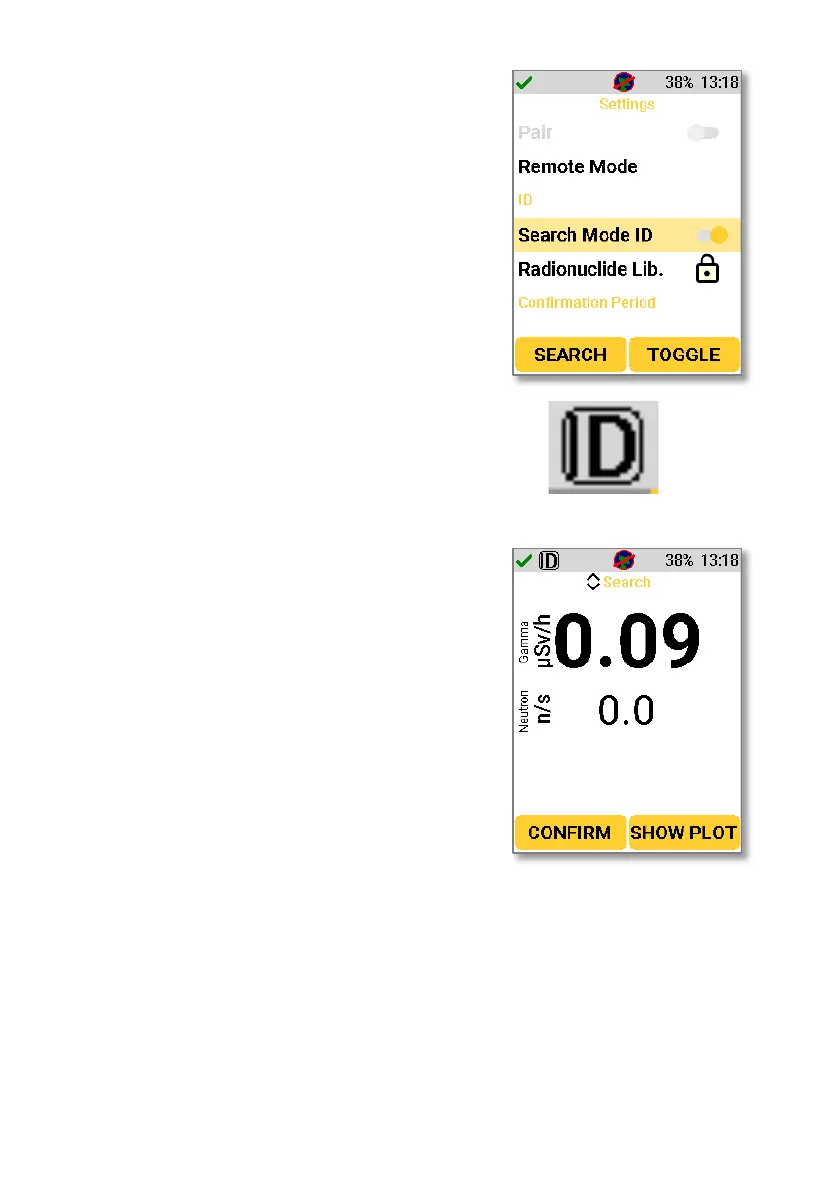
To ensure that the device is using Search
Mode with ID, press either the up or down
key to bring up the main menu and
navigate to “Settings”. When in the
settings section of the main menu, use the
up and down keys to navigate to “Search
Mode ID” under the ID section of the
settings menu. This should be toggled on,
as shown below to ensure that the device
is using Search Mode with ID.
If the device is operating in Search Mode
with ID, then the ID icon in the top left-
hand corner will not have a line through it.
5.2.2. Using Search Mode with ID
The D5 RIID continuously scans the area
for threats when the Search Mode screen
is shown. The gamma dose rate is always
shown on the screen and can be displayed
in Sv/h or R/h. The values automatically
scale between µSv/h, mSv/h or Sv/h (or
their R/h equivalents) as radiation levels
change.
From this screen, clicking the left key to
select “Confirm” moves the device to
Confirmation Mode (Section 5.3).



 To Next Page