MAL-OPS-1026 v3 22
5.3.1. Using Confirmation Mode
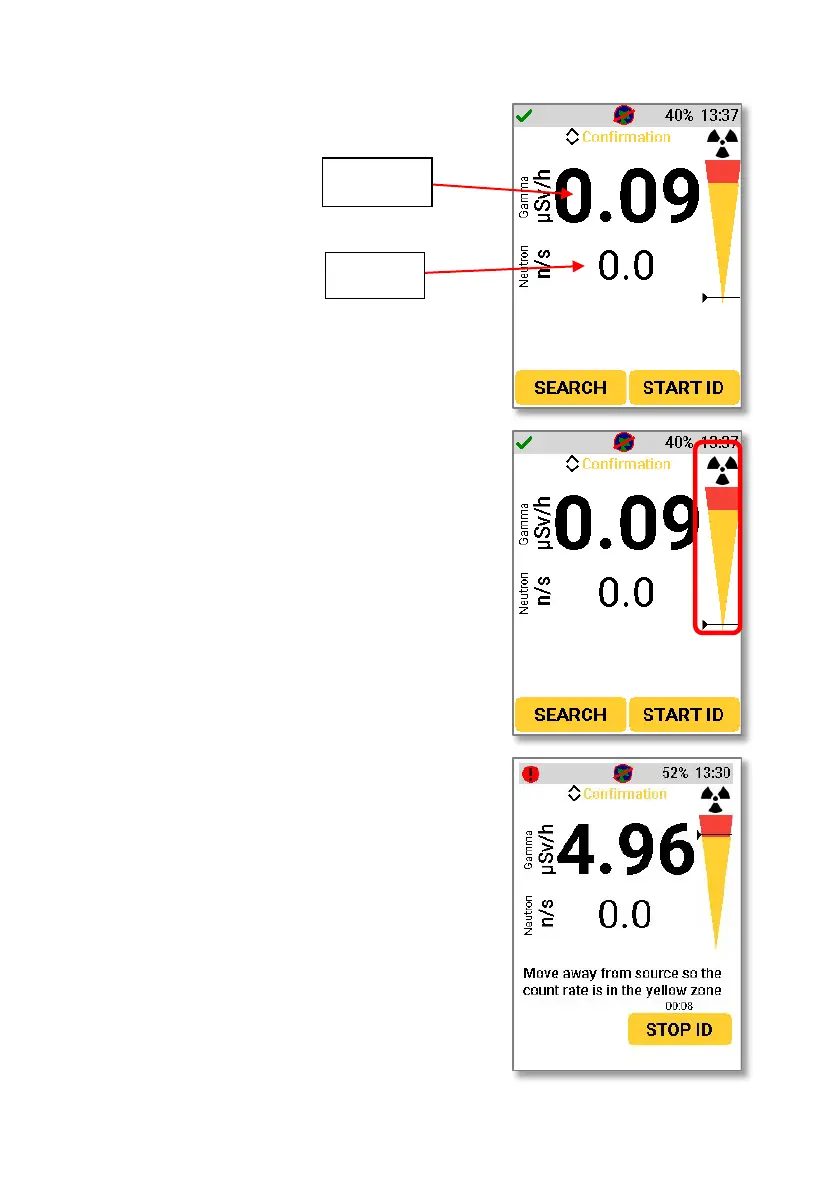
rate and neutron
rate are still visible
on the screen in this
mode and display as
they would in
Search Mode.
Using the right-hand button to select
“Start ID” will start a scan for a user
selectable amount of time. It is possible to
choose a scan time of 30 seconds, 2
minutes, 5 minutes, or a variable
confirmation time. Instructions on how to
change this confirmation mode scan time
can be found in Section 9.9.
The bar showing an orange region and red
region on the right side of the screen
allows a user to position the device
appropriately to obtain reliable spectral
data. To ensure solid spectral data, the
horizontal black bar should be somewhere
within the orange section.
As the user moves closer to the source,
the horizontal black bar will move closer
to the red section. If the user moves too
close to the source, then the horizontal
black bar will fall into the red section
which indicates that solid spectral data
cannot be collected. A user should move
further away from the source in this
instance and continue with the reading.



 To Next Page