MAL-OPS-1026 v3 8
To power the D5 RIID on, press and hold the power button for one second until
the screen illuminates. Release the button when the illuminated screen is shown.
To turn the D5 RIID off, press and hold the power button for five seconds until the
The D5 RIID performs a series of built-in tests upon powering on to determine if
there are any faults which affect device performance.
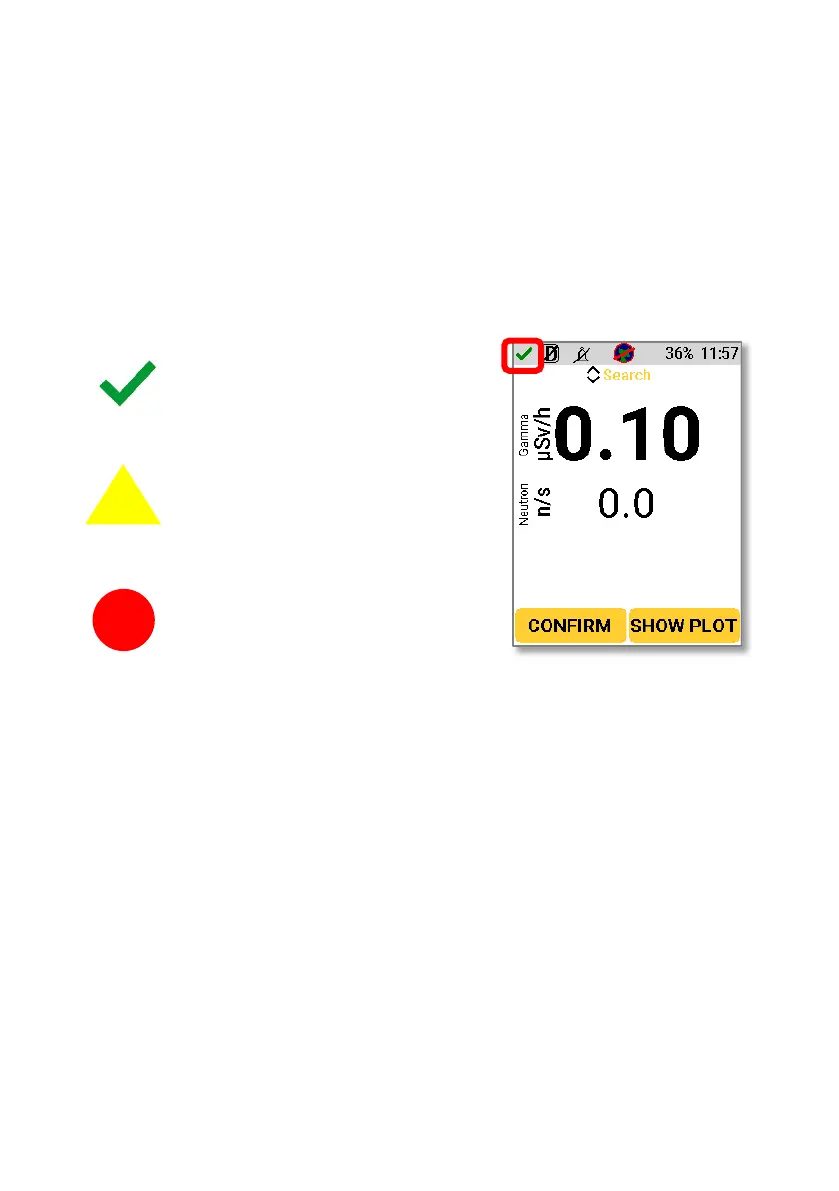
The device status is shown in the upper left corner.
A check mark in the top left-
hand corner indicates that
the device has no faults and
An exclamation point in a
yellow triangle indicates a
fault which should be
attended to before the
An exclamation point in a red
circle indicates an active
alarm.
Accessing information on faults is described in Section 14.
During use of the D5 RIID, messages can appear on the screen to aid use or to alert
the user to a problem. A full list of all messages is given in Section 14.
The D5 RIID has an internal rechargeable lithium-ion battery and replaceable AA
batteries. The device can be used with only the rechargeable batteries, only the
replaceable batteries or a combination of the two.
When power is connected via the USB cable, the D5 RIID will start charging,
indicated by the waving LED light.
Both standard AC and DC sources can be used to charge the D5 RIID.



 To Next Page