MAL-OPS-1026 v3 28
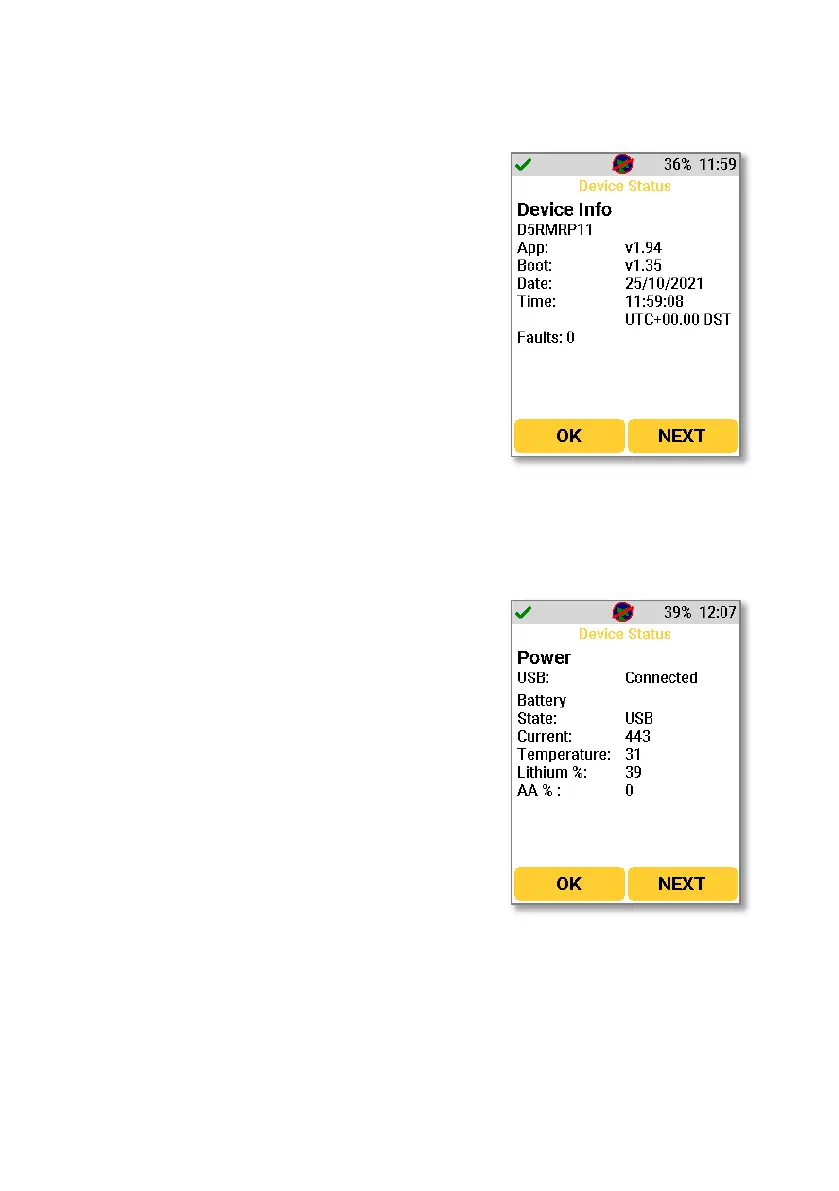
The first screen gives information on the device.
Serial Number: The serial number of the device
is given just below the main heading.
App: Shows the current firmware version.
Boot: Shows the current bootloader version.
Date: Shows the current date.
Time: Shows the current time.
Faults: Shows the current number of faults. Text
will be shown with a fault description if a fault
occurs.
Pressing “Next” from the device info screen shows the power status. In this
screen, the following information is shown.
USB: Shows as “connected” when the D5 RIID is
connected to a device or power source via USB
and shows as “disconnected” when there is no
USB connection.
Battery State: Shows as “lithium” when the D5
RIID is using the internal rechargeable battery,
shows as “AA” when the D5 RIID is using the
replaceable batteries and shows as “USB” when
the device has a USB connection.
Current: Shows the current being supplied to or
lost from the detector.
Temperature: Shows the current temperature of
the device.
Lithium %: Shows the battery percentage of the
internal, lithium-ion battery
AA%: Shows the battery percentage of the
replaceable AA batteries



 To Next Page