MAL-OPS-1026 v3 9
When the D5 RIID is fully charged, the LED will show as a solid white light.
If the D5 RIID is powered off while charging, the indicator light will be white.
For more information on LED colours and light operation, see Section 4.
To ensure proper working of the device, the D5 RIID should be periodically
charged even when not in use.
The D5 RIID should not be charged at temperatures below 0°C.
Battery levels should be checked before every use and the battery should be
charged or the replaceable batteries should be replaced if required.
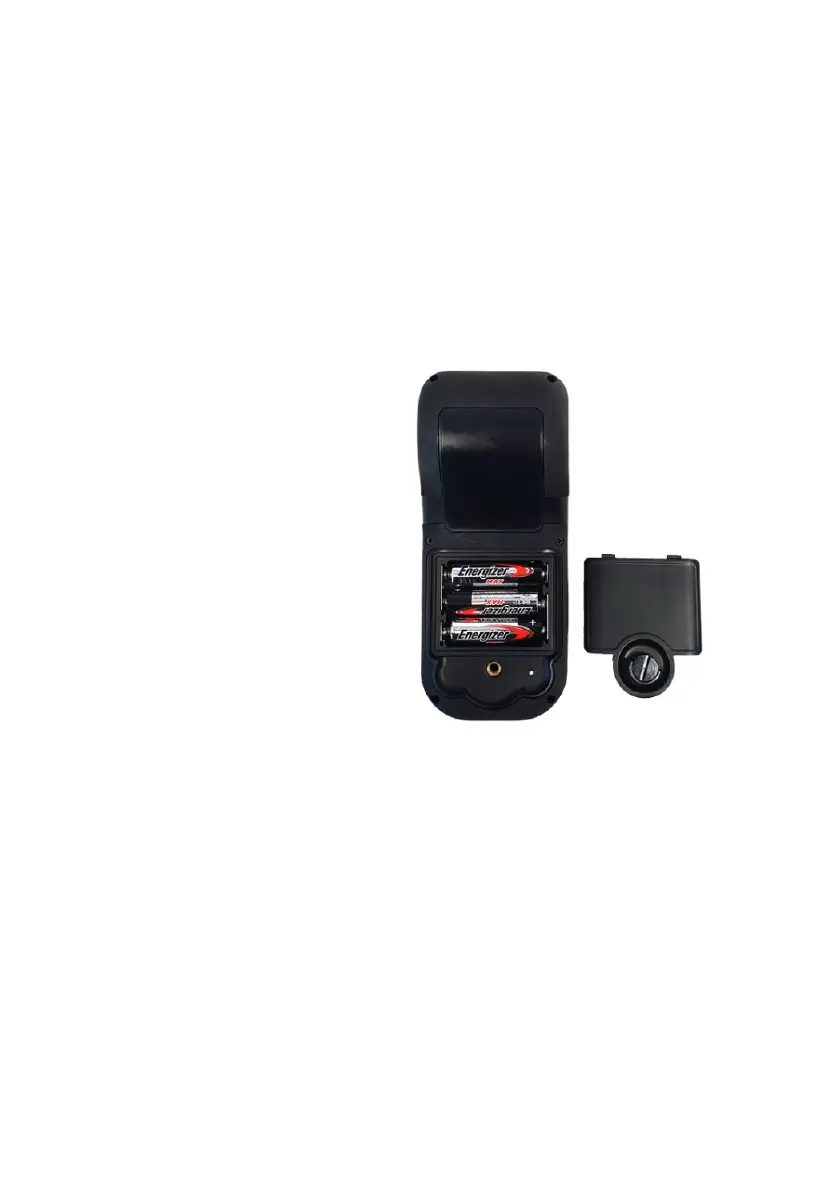
The battery compartment can
be accessed while wearing all
manner of personal protective
equipment, including gloves.
The D clip is lifted so that it is
perpendicular to the back of
the D5 RIID. It can then be
turned anticlockwise until the
battery compartment opens.
Battery replacement can be
done without powering the D5
RIID down.
AA batteries should be
removed from the device
before storage.
The battery indication is displayed as a percentage in the top right-hand corner.
The currently active battery can be viewed in the power settings (Section 9.2.2).
The user is given two battery indications for low battery. The device has a low
battery indication.



 To Next Page