MAL-OPS-1026 v3 23
If a 30 second, 2 minute or 5-minute scan time is selected, then the scan will
automatically stop after the selected timeframe. The confirmed isotope or
multiple isotopes will be shown on the screen if an identification could be made.
It is possible to enable a completion tone, as shown in Section 9.10, which will
alert the user to the end of the confirmation scan. This can be enabled or disabled.
Each isotope will be categorised as industrial, medical, NORM or special nuclear
material as shown by the associated icon. The categorisation icons are as follows:
Special Nuclear
Material icon
Industrial icon
NORM icon
Medical icon
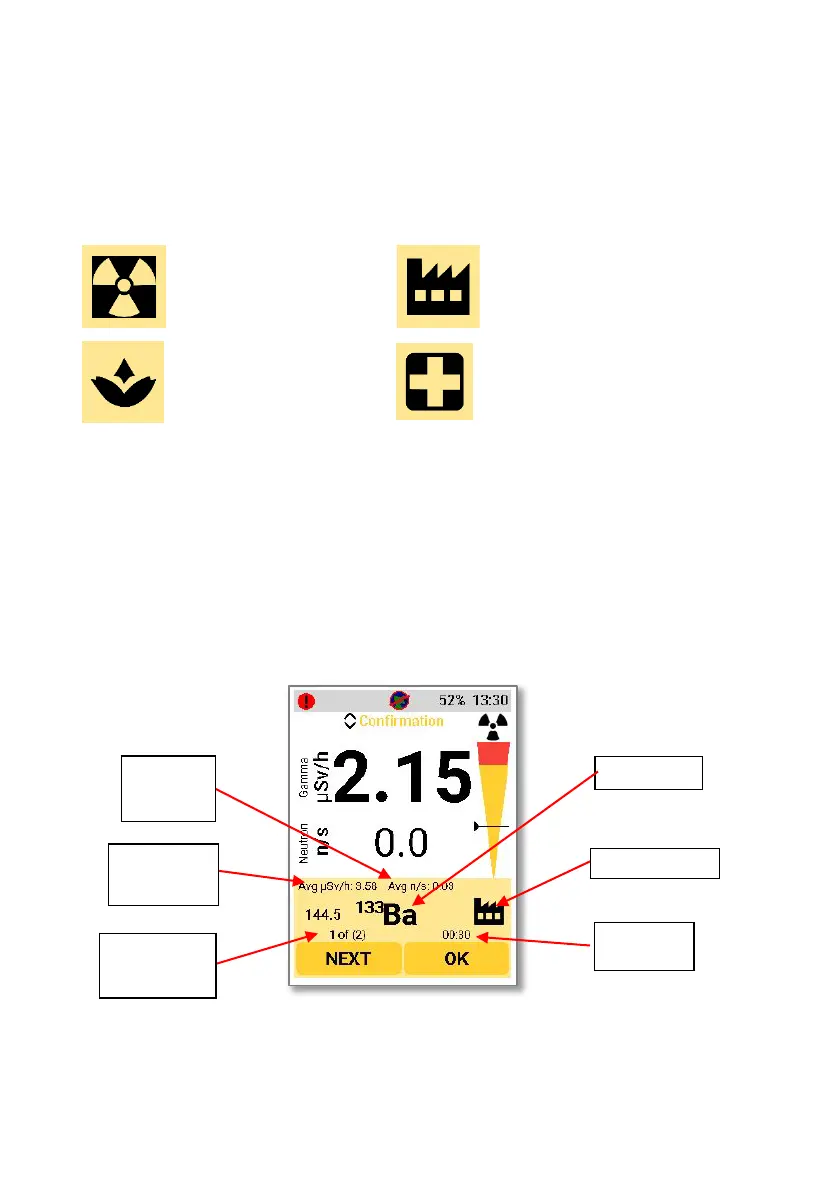
The confidence level is also shown on the alarm.
The average gamma dose rate and neutron rate seen by the detector during the
scan duration will also be shown on the alarm.
The D5 RIID can detect multiple isotopes. If multiple isotopes are detected, then
the alarm indication will show “1 of 2”, “1 of 3”, “1 of 4” etc depending on the
number of isotopes. Using the left-hand button to select “Next” will show the
other identified isotopes.
Neutron
Gamma
Isotopes



 To Next Page