OPERATING ELEMENTS 57
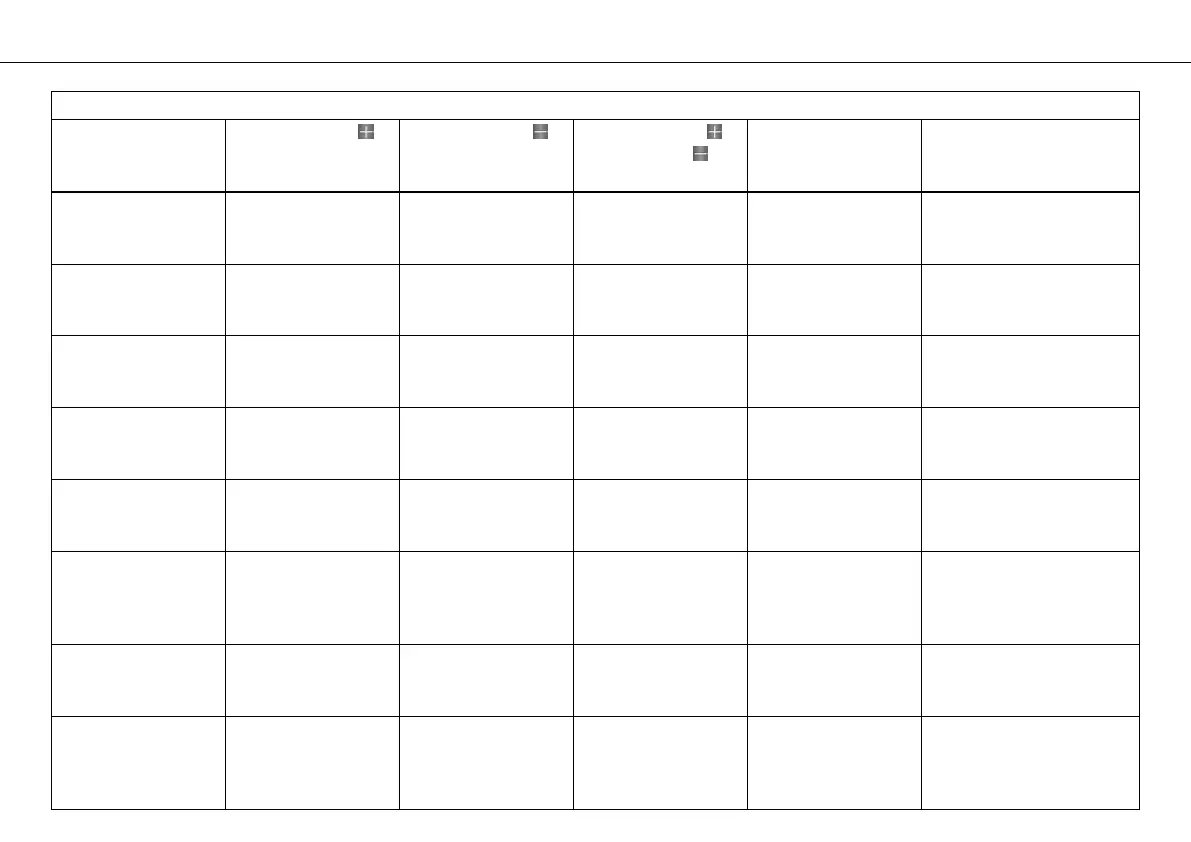
Table of functions
Display Press the button . Press the button . Press the button
and the button for
3 - 5 seconds.
Press the MODE but-
ton for 3 - 5 sec-
onds.
Press the MODE button
briefly.
Odometer menu
ODO/Trip 1
No function No function The display
changes to the
SET‑UP menu
The display of
Trip 1, Time 1 and
Avs 1 is reset
Next display mode
Odometer menu
ODO/Trip 2
No function No function The display
changes to the
SET‑UP menu
The display of
Trip 2, Time 2 and
Avs 2 is reset
Next display mode
FUELDISTANCE
menu
No function No function The display
changes to the
SET‑UP menu
No function Next display mode
FUELRANGE menu No function No function The display
changes to the
SET‑UP menu
No function Next display mode
DISTANCE TO
Next Service menu
No function No function The display
changes to the
SET‑UP menu
No function Next display mode
LAPSTOGO menu No function No function The display
changes to the
SET‑UP menu
All values in
RACE mode are
reset (except
RACEODO)
Next display mode
TOPSPEED menu No function No function The display
changes to the
SET‑UP menu
The display of Last-
Lap, ±Last and
±Best are set to 0
Next display mode
LAP/BESTLAP/Last-
Lap menu
The next lap is dis-
played
The previous lap is
displayed
The display
changes to the
SET‑UP menu
All values in
RACE mode are
reset (except
RACEODO)
Next display mode








 To Next Page