OPERATING ELEMENTS 58
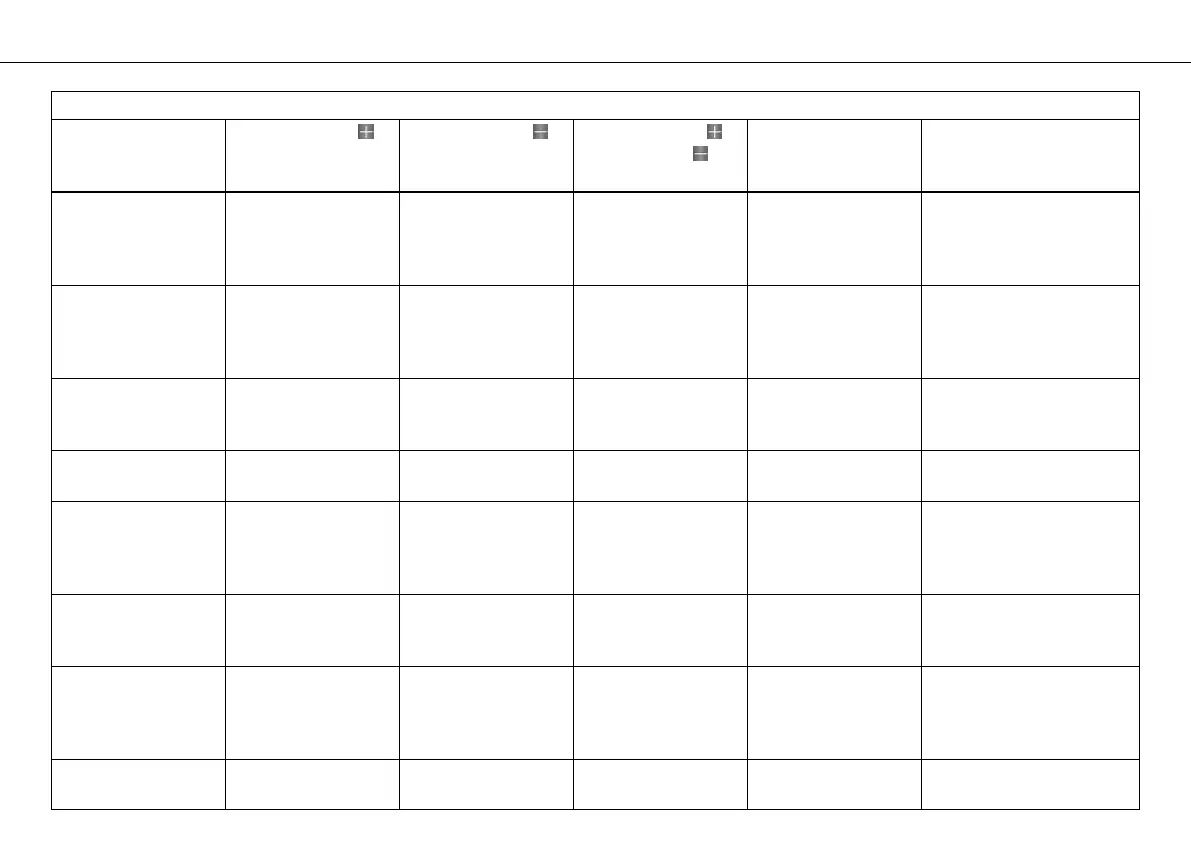
Table of functions
Display Press the button . Press the button . Press the button
and the button for
3 - 5 seconds.
Press the MODE but-
ton for 3 - 5 sec-
onds.
Press the MODE button
briefly.
LAP/BESTLAP/Top-
Speed menu
The next lap is dis-
played
The previous lap is
displayed
The display
changes to the
SET‑UP menu
All values in
RACE mode are
reset (except
RACEODO)
Next display mode
Total distance
menu in Race mode
RACEODO
No function No function The display
changes to the
SET‑UP menu
All values in
RACE mode are
reset (except
RACEODO)
Next display mode
SET‑UP menu The arrow moves up The arrow moves
down
no function The menu in front
of the arrow is
selected
The menu in front of the
arrow is selected
CHANGE MODE
menu
Changes the menu Changes the menu no function Open and exit
CHANGE MODE
Open and exit
CHANGE MODE
SET CLOCK menu increases the value decreases the value no function Open and
exit SET CLOCK or
change to next
value
Open and exit SET CLOCK
or change to next value
SETTINGS menu The arrow moves up The arrow moves
down
no function The menu in front
of the arrow is
selected
The menu in front of the
arrow is selected
SHIFT RPMS menu increases the value decreases the value no function Open and exit
SHIFT RPMS or
change to the next
value
Open and exit
SHIFT RPMS or change to
the next value
LAP menu,
LAP BLANK T button
increases the value decreases the value no function Open and exit
LAP BLANK T
Open and exit
LAP BLANK T


 To Next Page
 Loading...