12
3 Brief Description
3.1 Display and Operational Controls
Selection/display of operating parameter
Status Firing-rate rating Setpoint Actual value feedback Setpoint feedback digital inputs
Operating parameters "Status"
(Standard)
Change display operating parameters with key M.
Select values via keys 17 and 16
Selection mode of operation:
PARM O
2
EI
1)
AUTO EINS SPLO*
Mode of operation AUTO
(Standard)
Change mode of operation with key 13 and 14
Selection display watchdog pro-
cessor (alternative)
First select with key 13 mode of operation PARM. Press keys 13
and 15 simultaneously to change to display "UEAN"
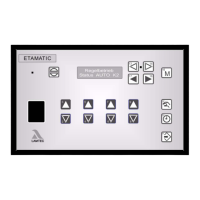
Fig. 3-1 Front panel ETAMATIC
Changing display
– fuel/air ratio
controll
–O
2
EI
1)
– flame intensi-
ty
1)
– power control
uni
1)
Legend for mode of operation and options:
PARM = Parameter settings
AUTO = Automatic
EINS = Setting
SPLO = Clear memory
O
2
EI = O
2
-Setting
1)
only if activated in the parameter section


 To Next Page