47
6 O
2
Trim
6.9.6 O
2
Curve Input
NOTICE
O
2
setpoints can only be saved to the programmed firing rate points. If firing rate points are
skipped, a linear interpolation is applied in between.
6.9.6.1 Changing O
2
Setpoints
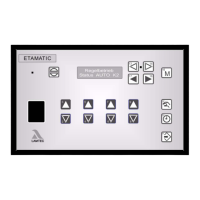
Press keys 13 and 14 to select "Set O
2
”
Delete the entire O
2
curve with Key 9
If only points should be modified, press key 8
Set to firing rate value with keys 16 and 17.
Use keys 2 and 3 to start the programmed firing rate points of the common fuel/air
ratio control curve.
Press key 16
Press keys 8 and 9 to set the required O
2
setpoint.
Press key 11 ENTER to save the setpoint
Press key 17.
Press keys 2 and 3 to address the next firing rate point.
etc.
As soon as you have entered all required O
2
setpoints, press key 14
The O
2
setpoints curve is now stored.
Proceed as described under O
2
setpoint input, but press key 8 instead of key 9.


 To Next Page