30
5 Commissioning
5.2 Setting
5.2.1 Setting the Limit Switches of the Motors
As soon as the ETAMATIC is supplied with voltage, it attempts to drive the actuator motors to
the lower limit of the factory set curve. If the end-bearing's limit switches are not properly ad-
justed for this, the motor may hit the actuator's mechanical stop
WARNING!
This may damage the motor or the valve.
Therefore:
Check the position of the end-bearing limit switches in the motors, taking into account the mo-
tor output shaft's travel.
If in doubt, set a shorter travel. It may be readjusted later.
5.2.2 Adjusting Control Elements
Enter password (see chapter ExternalLink: Passworteingabe).
Display approx. 80-100 digit on three-point step outputs. If the display shows other values, set
the limit switches in the motors and/or potentiometers accordingly.
Display approx. 200 digit on ETAMATIC/ETAMATIC S channel 1 with 4 to 20 mA feedback.
With integral speed evaluation the number of digits depends on the setting of the frequency
converter (if necessary release fan manually)
NOTICE
Never change settings of frequency converter or speed control feedback after programming
the setpoint values at Gerät., otherwise you will have to program the curve again.
5.2.2.1 Enter the Curve
Select fuel (signal to terminal 49)
Enter password (see chapter 5.1.2 Password Entry).
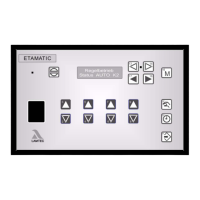
Press keys 13 and 14 to select "Set"
Press keys 16 and 17 to set "setpoint"
With the keys 2; 4; 6 and 8 set all control elements “000“
Press key 16 to actual value feedback.


 To Next Page