42
6 O
2
Trim
6.8 Operation and Display of the O2 Trim
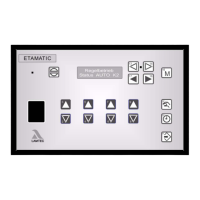
When you have switched to "Status", the display shows the O
2
actual value and O
2
setpoint
value. The display shows the values in brackets, if O
2
trim is deactivated.
NOTICE
O
2
actual value and O
2
setpoint are only displayed, if O
2
trim or O
2
display are activated in
parameter 896.
In automatic operation, the display switches during regular operation automatically to O
2
trim
mode. However, it is always possible to switch the display over with key "M". The manually
preselected setting only remains in force until the next switch to "Regular operation” or "Base
firing rate operation”, and then returns automatically to the base setting.
6.8.1 Display and Interpretation of the Operating Modes
Press key 15 once, to switch the display to O
2
-trim.
Mode "O
2
-trim": By pressing key "ENTER" (display in position "Status"), you can call up
information texts (running texts)
op O
2
trim in standby (during burner start-up), or O
2
trim temporarily switched off as a func-
tion firing rate via parameters 914 and 915.
or O
2
- trim active.
ot O
2
trim temporarily deactivated (air deficiency, probe dynamics etc).
od O
2
trim deactivated (fault), e.g. test routine failed during burner start-up, dynamic test
negative, O
2
trim temporarily deactivated for over 1 hour etc.
C Optimisation at increasing firing rate
c Optimisation at decreasing firing rate
Resetting od:
Press key RESET
press key 7 twice
Every burner start causes the reset of the faults automatically.


 To Next Page