Maximum Power: The maximum power in watts that can be delivered to a remote device. If you want the port to support
IEEE802.3at, the maximum allowed value is 30 W.
Detection: Type of detection. Select Legacy, 4-Point, 4-Point-Legacy, 2-Point or 2-Point-Legacy.
Reset: Reset the specific PoE port.
Buttons:
Apply – Apply changes.
Reset – Undo any changes made locally and revert to previously saved values.
3.15.2 Status
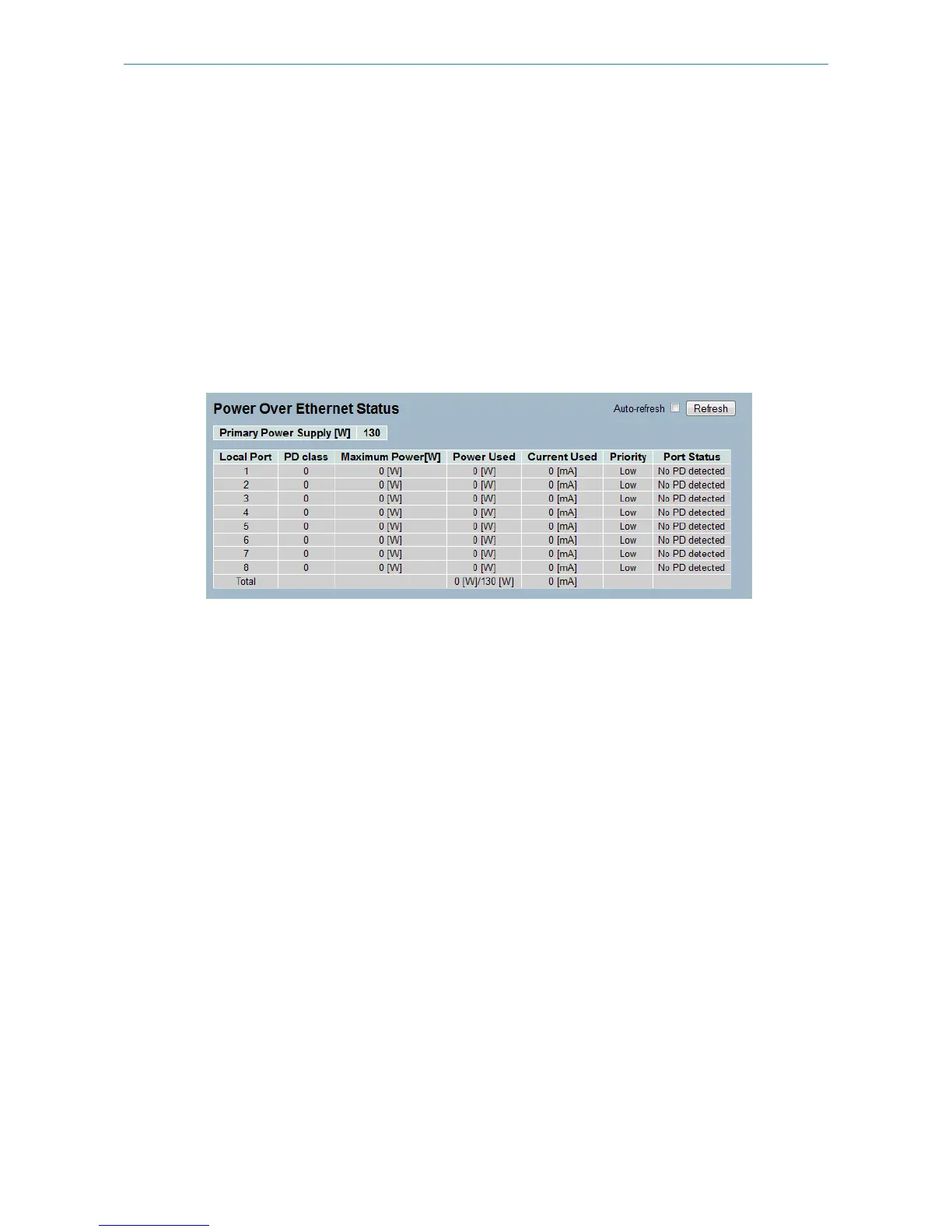
This page allows the user to inspect the current status for all PoE ports.
Figure 3-15.2: The PoE Status
Parameter description:
Primary Power Supply: The amount of power the source can deliver to the PDs in total.
Local Port: The logical port number for this row.
PD Class: The class the of PDs that identify with a specified current. The classification current describes the amount of
power the PD will require during normal operation.
Maximum Power: The maximum power in watts that can be delivered to a remote device.
Power Used: The power the PD currently is using.
Current Used: The current the PD currently is using.
Priority: The port's power supply priority.
Port Status: The port's status.
Auto-refresh: Refresh the port information automatically.
Buttons:
Refesh – Refresh the port information manually.
3.15.3 Power Delay
This page allows the user to set the delay time of power supply after the reboot of a device.
Figure 3-15.3: The PoE Power Delay
122
LANCOM GS-2310P/GS-2326(P) User Manual
3 Configuration



 To Next Page