4.6.7 Trap
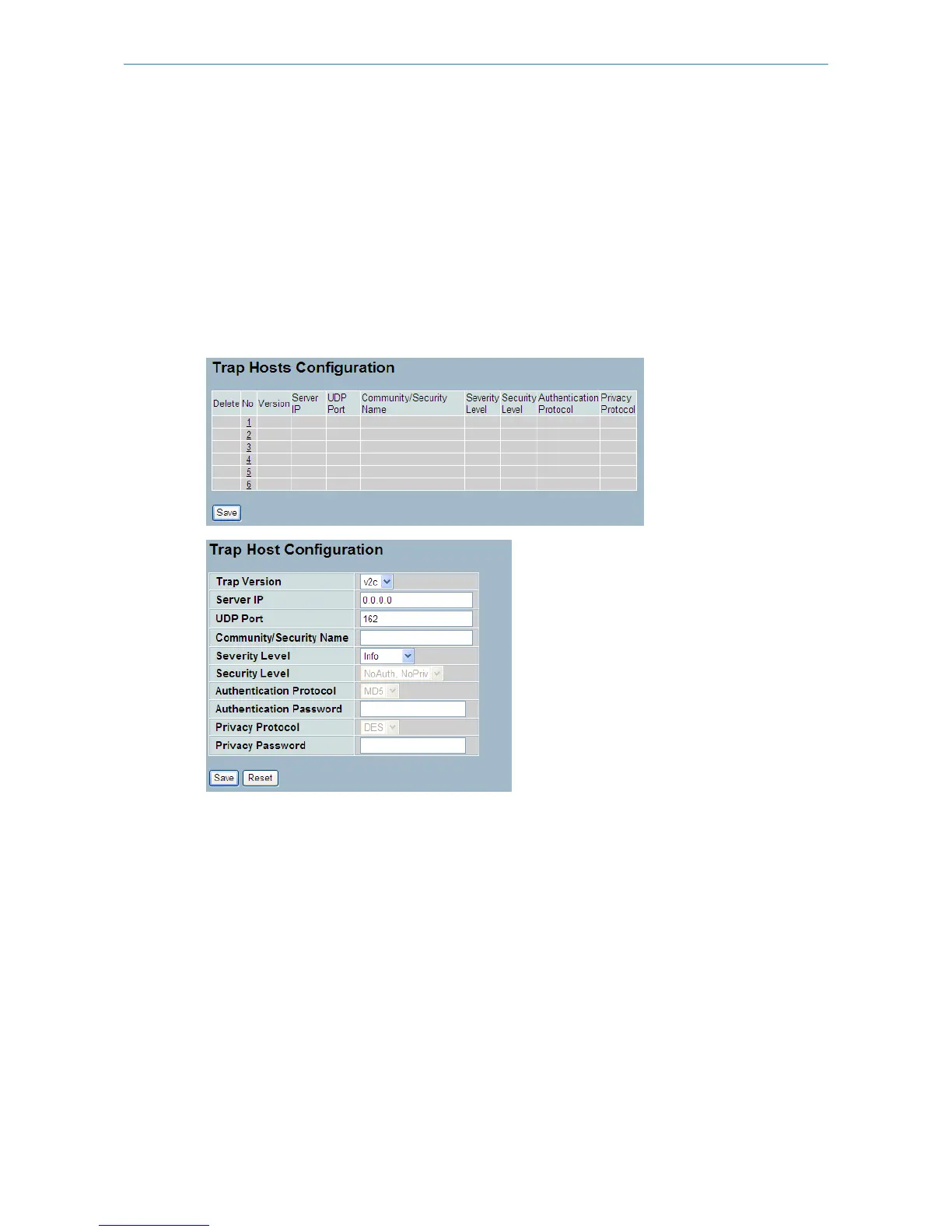
The function is used to configure SNMP traps. To create a new trap account, please click on the <No number> button,
and enter the trap information then click <Apply>. Max group number: 6.
Web Interface
To configure SNMP Traps:
1. Click SNMP, Trap.
2. Display the SNMP Trap Hosts information table.
3. Choose an entry to display and modify the detail parameters or click the delete button to delete the entry.
Figure 4-6.7: The SNMP Trap Host Configuration
Parameters description:
Delete:
Check <Delete> entry then click the <Save> button, the entry will be deleted.
Trap Version:
You may choose v1, v2c or v3 trap.
Server IP:
Used SNMP Host IP address.
UDP Port:
Used Port number. Default: 162
Community / Security Name:
The length of “Community / Security Name” string is restricted to 1-32.
Security Level:
158
LANCOM GS-2310P/GS-2326(P) User Manual
4 System Configuration



 To Next Page