101
www.lannerinc.com
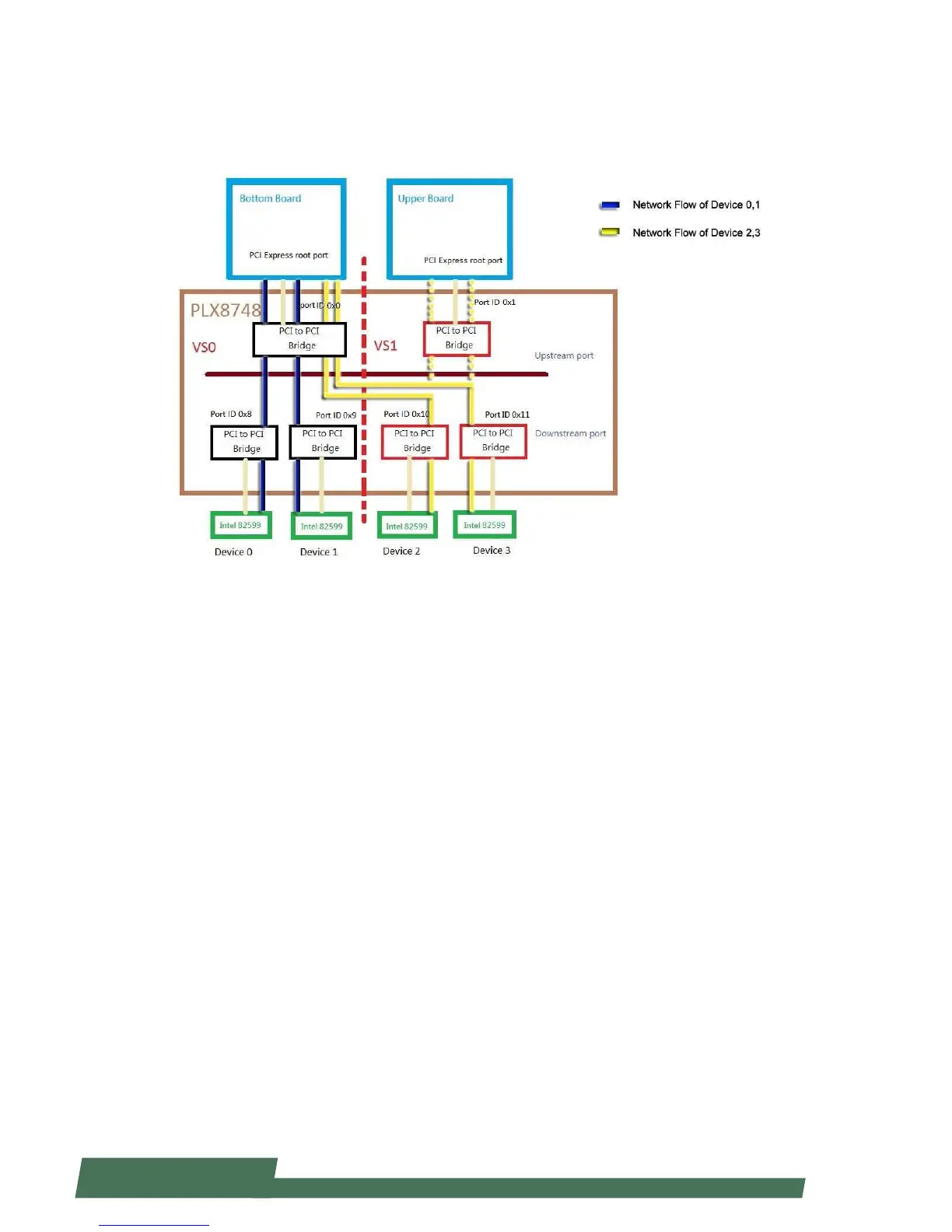
Scenario 1: The Bottom Board as the Management Port, and the Device 2 and 3 Taken
Over by the Bottom Board.
Please see the figure below.
Remove the driver from the Device 2 and 3
1. Remove the Device 2 and 3 from the Upper Board first.
2. For the Upper Board, please issue the following command:
~# sh ./stop_lan_device.sh 0 all
Instructions of Commands
<stop_lan_device.sh>
Parameters:
stop_lan_device.sh slot_number mode
slot_number : The slot that would like to be removed. Valid value: 0, 1, and 2.
mode : current (default port)
rescue ( failover port)
all (all devices for the slot)
Function Description:
Remove the driver from the device, and delete it.
Main Commands of the Script:
~# ifconfig eth(N) 0.0.0.0 down
~# echo 1 > /sys/bus/pci/devices/”lan bus ID”/remove
~# echo 1 > /sys/bus/pci/devices/”downstream port bus ID”/remove



 To Next Page