31
www.lannerinc.com
SATA Connector direction
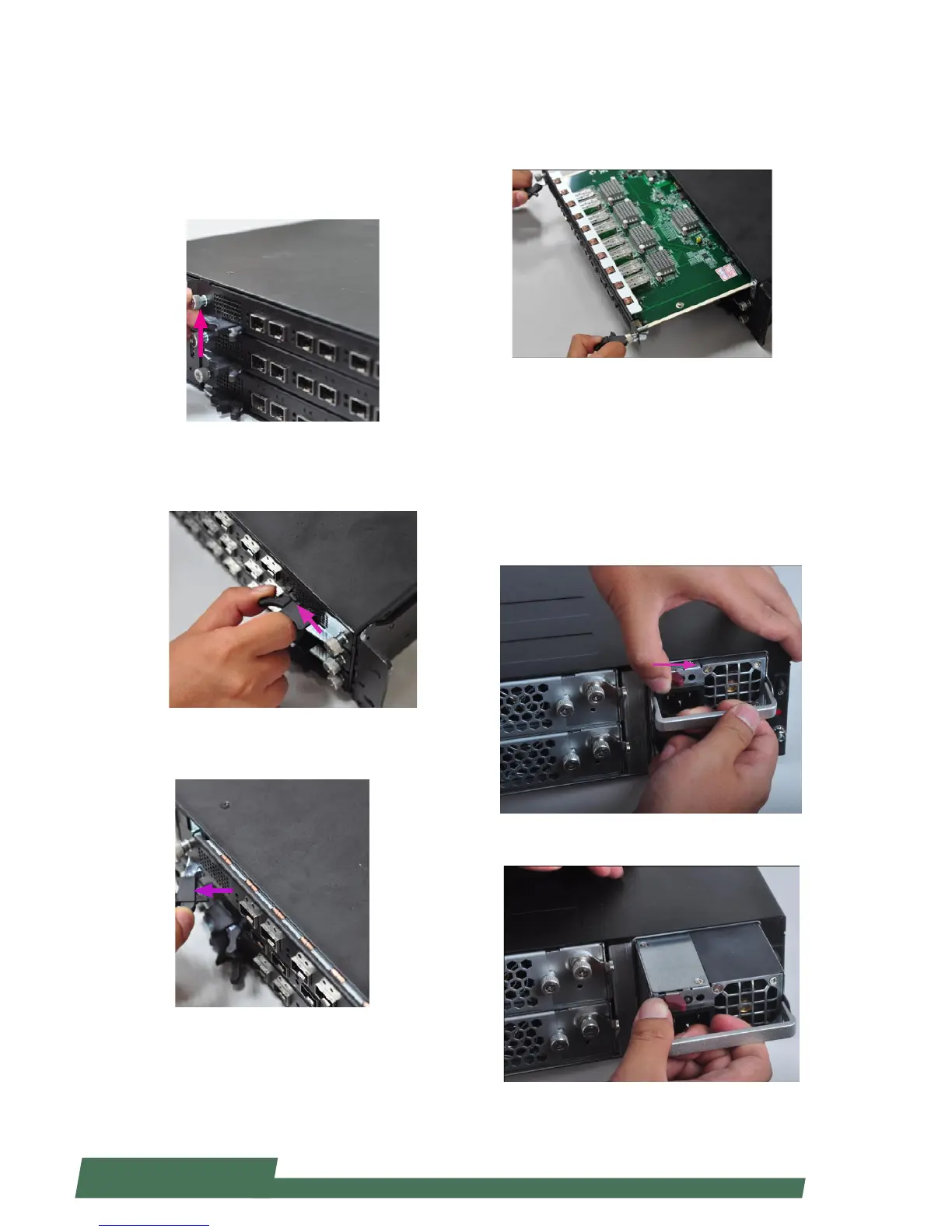
Replacing Network I/O Modules
Please follow the instructions below to replace network
I/O modules. The images of network I/O modules below
are based on Lanner TCM-IXT801A model.
1. Loosen the lock-screw on two sides of the network I/O
module.
2. Hold and press the lock-handle as the arrow of direc-
tion in the image below. Remember to do it for both lock-
handles at the same time.
3. While pressing both lock-handles as instructed in the
last step, then pull both lock-handles outwards at the
same time.
4. Continue to apply force when removing the module.
To install a module, just reverse the steps in this section.
Replacing Power Supply Units
Power supply units may have to be replaced when
they reach the end of their liftetime. Please follow the
instructions below to replace power supply units.
1. Locate the power supply units at the rear. Hold the
handle and press the lock as the arrow of direction in the
image below.
2. Pull the power supply unit out.



 To Next Page