EasyManua.ls Logo

Laser 128 - Page 21

Laser 128
255 pages
Print Icon
To Next Page IconTo Next Page
To Previous Page IconTo Previous Page
Loading...
GETTING
FAMILIAR
WITH
THE
LASER 128/128EX
2.
GETTING FAMILIAR
WITH
THE
LASER 128/128EX
B
efo
re
you
begin
to
work
with
your
computer,
you
should
learn
something
about
the
function
of
each
of
it
s
compo
nents:
"i===i--
(il11
MOSO/COlOA S\\1TC"ll
.----t---<••
]
DR
I
\'[
I
NDICATOR
~--+-
<>s]
CAPS
LOC'tr.
I
NDICATOR
l=
======
~=l=l:U;;
;;;;;r
-\!J•
PO"C
R "
DICATOR
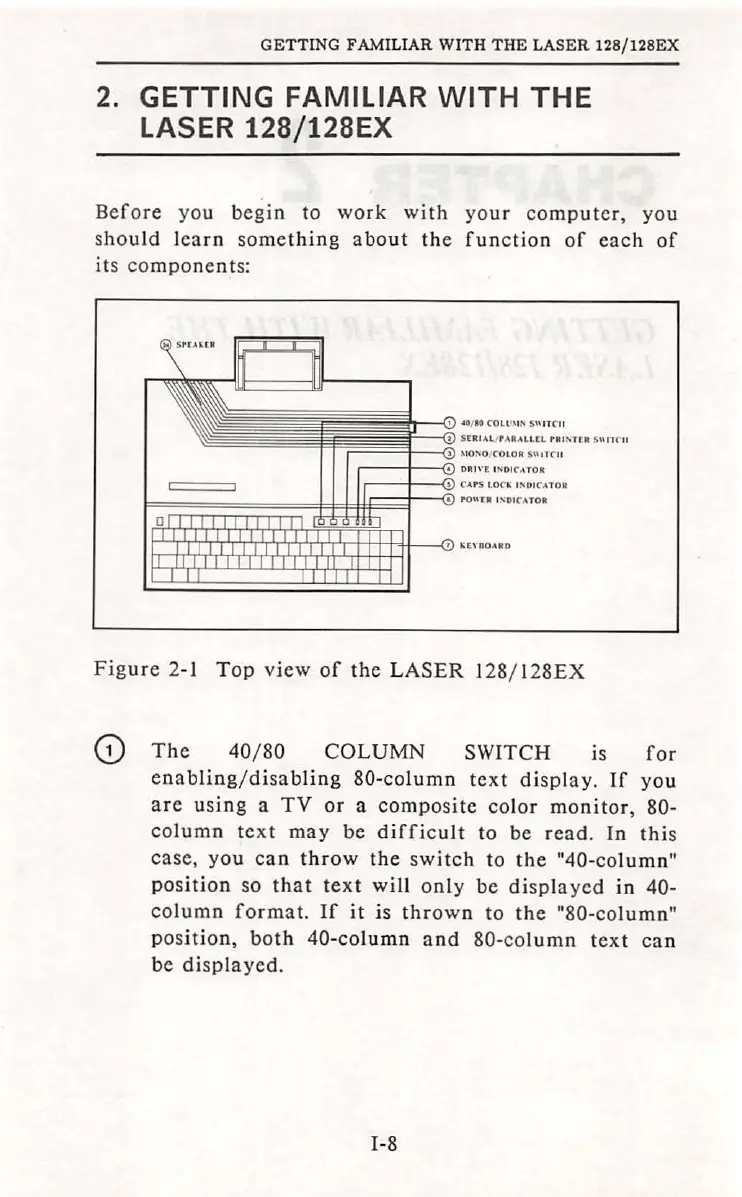
Figure
2-1
Top
view
of
the
LASER
128/ 1
28EX
G)
The
40/ 80
COLUMN
SWITCH is
for
enabling/disabling
80-column
text
display
.
If
you
are
using
a
TV
or
a
composite
color
monitor,
80-
column
text
may
be
difficult
to be
read
.
In
this
case
,
you
can
throw
the
switch
to
the
"40
-column"
position
so
that text
will
only
be
displayed
in
40-
column
format.
If
it
is
thrown
to
the
"80-
colum
n"
po
s
ition,
both
40-column
and
80-column
text
can
be
displayed.
1-8

Table of Contents