EasyManua.ls Logo

Laser 128 - Page 219

Laser 128
255 pages
Print Icon
To Next Page IconTo Next Page
To Previous Page IconTo Previous Page
Loading...
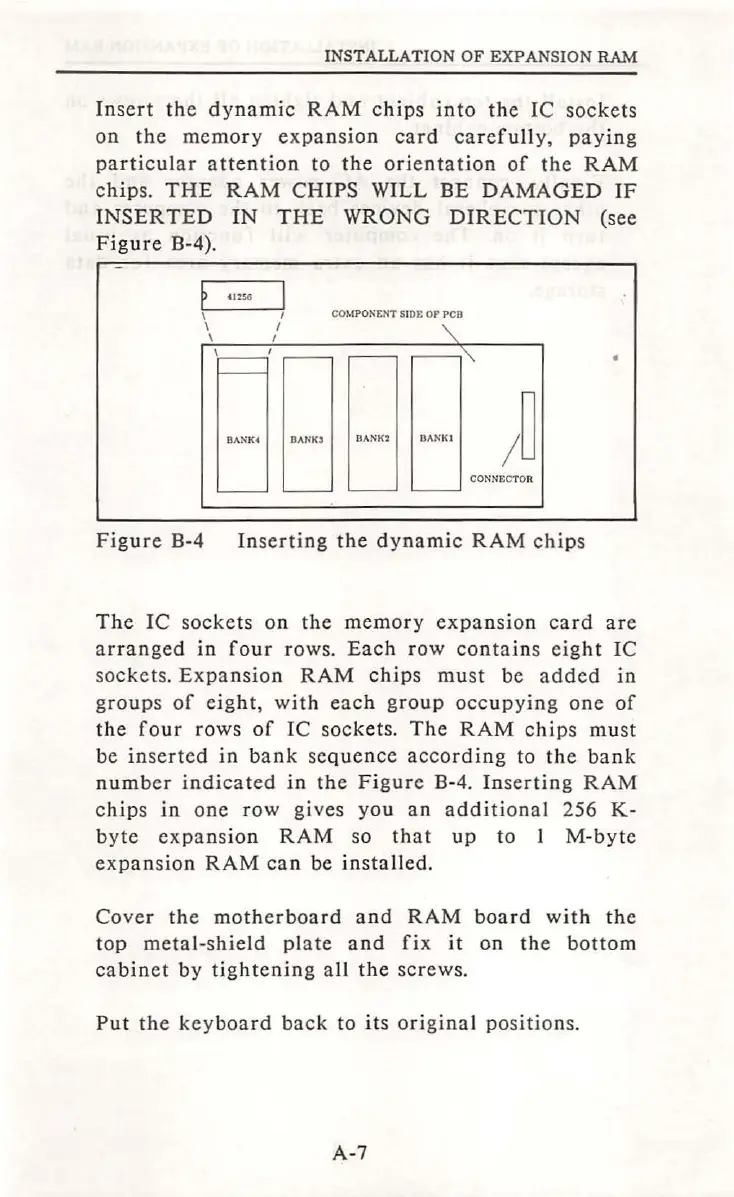
INSTALLATION OF EXPANSION RAM
Insert
the
dynamic
RAM
chips
into
the
IC
sockets
on
the
memory
expansion
card
carefully,
paying
particular
attention
to
the
orientation
of
the
RAM
chips.
THE
RAM
CHIPS
WILL
BE
DAMAGED
IF
INSERTED
IN
THE
WRONG
DIRECTION
(see
Figure
B-4).
p
0256
I
CO
MPONENT
SIDE
OP
PCB
\
\
BANK
4
DANK3
BA
NK2
D
ANK
t
/
~
CO
NN
ECTOR
Figure
B-4
Inserting
the
dynamic
RAM
chips
The
IC
sockets
on
the
memory
expansion
card
are
ar
ranged
in
four
rows.
Each
row
contains
eight
IC
sockets
.
Expansion
RAM
chips
must
be
added
in
groups
of
eight,
with
each
group
occupying
one
of
the
four
rows
of
IC
sockets.
The
RAM
chips
must
be
inserted
in
bank
sequence
according
to
the
bank
number
indicated
in
the
Figure
B-4.
Inserting
RAM
chips
in
one
row
gives
you
an
additional
256
K-
byte
expansion
RAM
so
that
up
to
1
M-byte
expa
n
sion
RAM
can
be
installed.
Cover
the
motherboard
a
nd
RAM
board
with
the
top
metal-shield
plate
and
fix
it
on
the
bottom
cabinet
by
tightening
all
the
screws.
Put
the
keyboard
back
to
it
s o
ri
gina
l
positions.
A-7

Table of Contents