17
6. Assembly
!
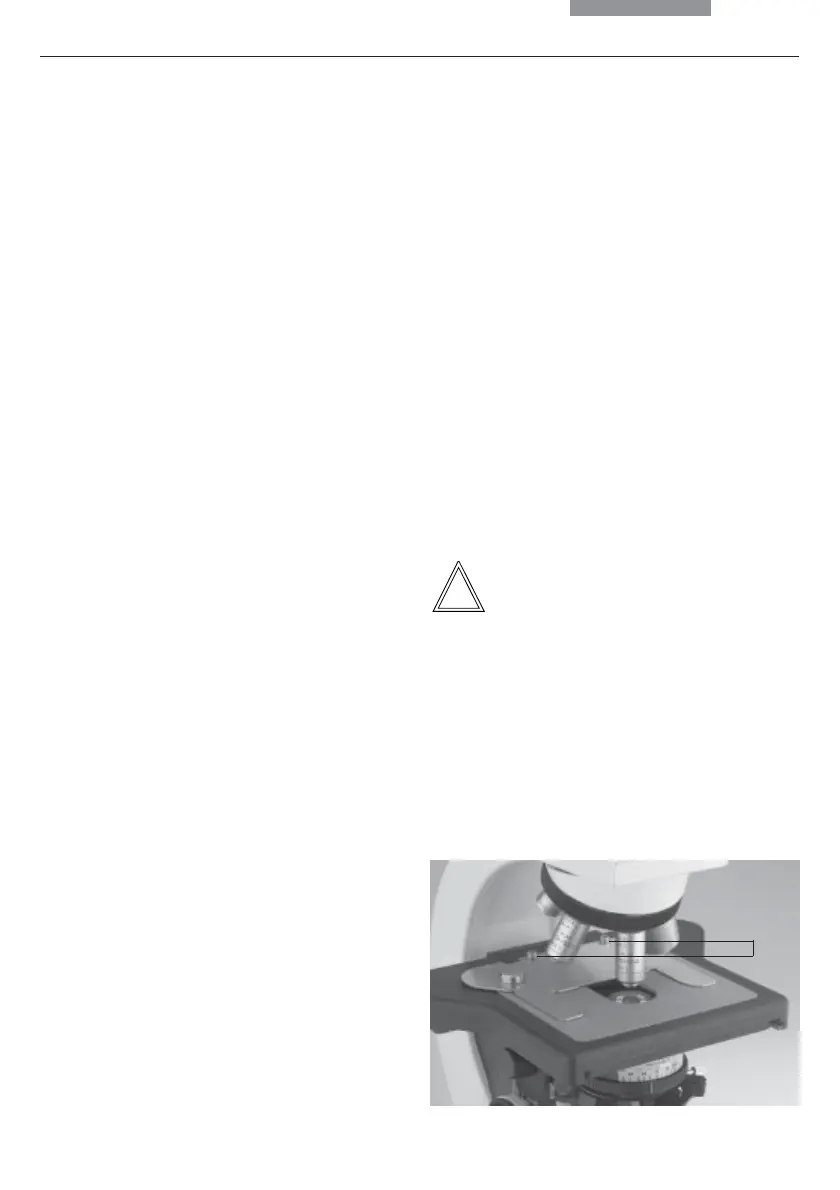
Fig. 4 Specimen stage with specimen holder
1 Lock screws for specimen holder
The microscope components are logically as-
sembled in this order:
• Stage
• Condenser
• Fluorescence*
• Intermediate systems*
• Tube
• Eyepieces
• Objectives
• Lamp housings with light sources
• Polarization*
Only one commonly used screwdriver is
necessary for assembly, which is included in
the delivery package.
The tool can be stored on a magnetic retainer
on the underside of the stage at the right.
When using intermediate systems and optical
accessories, the sequence may vary.
In this case, read Chapter
"6.10 Optional Accessories" → p. 28.
6.1 Stage
Caution:
Before completing the stage, make sure no ob-
jectives are installed!
Specimen Holder
• Place the specimen holder on the stage and
fasten it with the two screws (4.1).
Coaxial Pinion
Note:
The coaxial pinion can be mounted on the left-
or right-hand side.
1
6. Assembling the Microscope


 To Next Page