PREPARATION ▸ DIOPTER SETTINGS
35
ATTACHING
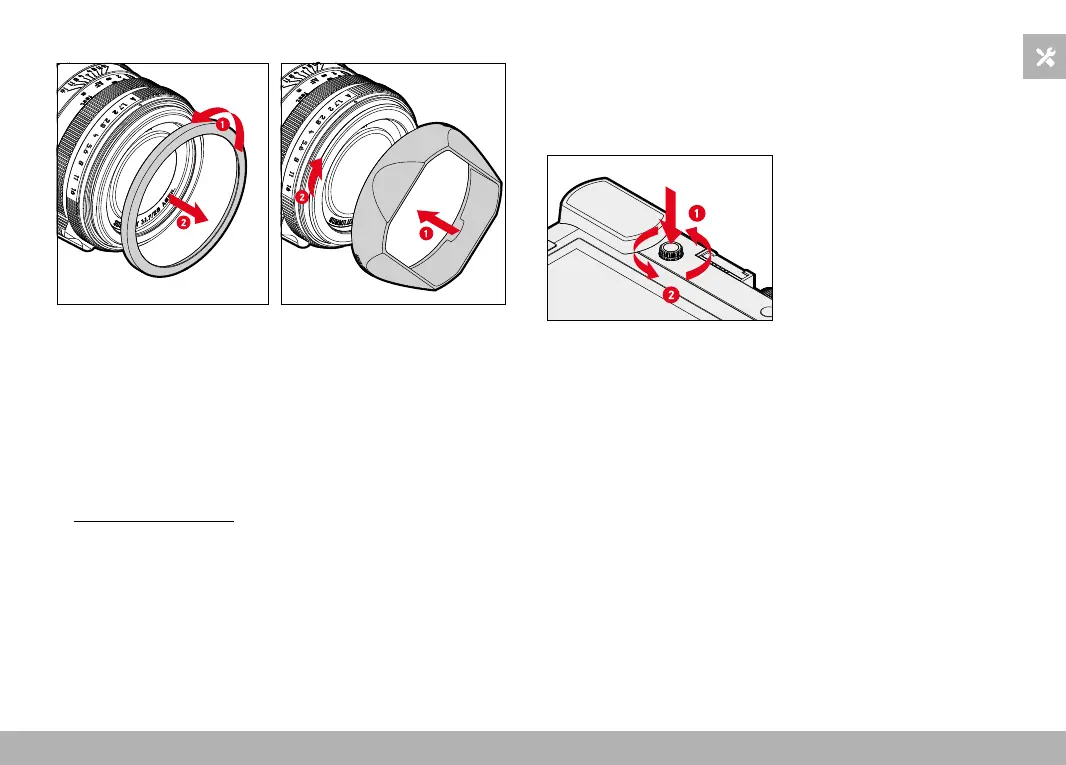
Fig. 1 Fig. 2
▸ Unscrew the thread protection ring in counter-clockwise direction
(Fig. 1)
▸ Screw on the lens hood in clockwise direction to the stop (Fig. 2)
Notes
• The lens hood cover supplied will only fit the lens hood and cannot
be used as lens cover on its own.
• A matching lens front cap E49 (Order No. 14001) is available as an
optional accessory for use of the camera without the lens hood:
store.leica-camera.com
DIOPTER SETTINGS
The viewfinder has a diopter setting function with a range between
-4 and +3 diopter to allow glasses wearers the use of the camera
without eyeglasses (diopter compensation).
▸ Push the diopter setting wheel into its groove until you hear an
audible click
• This unlocks the diopter setting wheel and it pushes out a little.
▸ Look through the viewfinder
▸ Aiming at and focusing on an object
▸ Push the diopter setting wheel back into its groove until it audibly
clicks into place



 To Next Page