PRACTICAL DEFAULT SETTINGS ▸ TOUCH AF
76
PRACTICAL DEFAULT SETTINGS
TOUCH AF
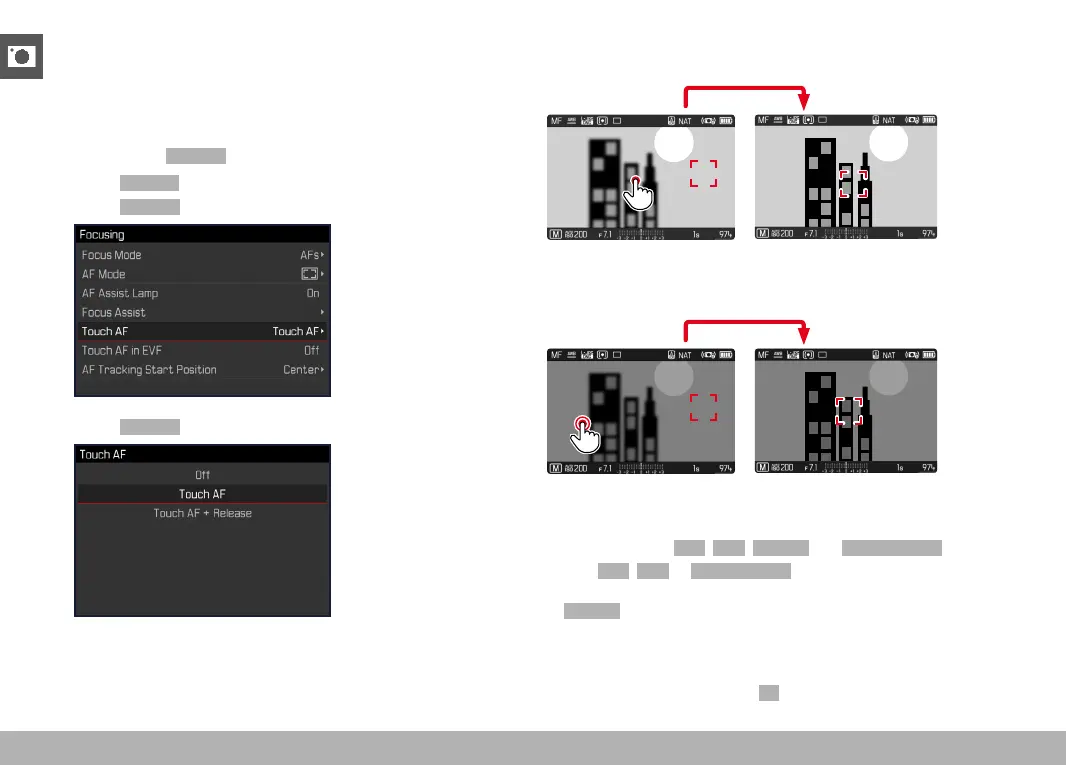
Touch AF allows a direct placement of the AF metering field.
Factory setting:
Touch AF
▸ Select Focusing in the main menu
▸ Select
Touch AF
▸ Select Touch AF
Positioning the AF Metering Field
▸ Tap the LCD panel in the desired position
1/80002.8F 12500ISO EV
-3 2 1 0 21 3+
823412MP
Moving the metering field back to the center of the screen
▸ Double-tap the LCD panel
1/80002.8F 12500ISO EV
-3 2 1 0 21 3+
823412MP
Notes
• This function is available in conjunction with the following AF me-
tering methods: Spot, Field, Tracking and Face Detection.
• With
Spot, Field or Face Detection metering selected, the camera
will immediately focus again automatically. If the metering method
Tracking is selected, the metering field will remain at the selected
position and autofocus commences when the shutter button is
tapped.
• The position of the AF metering field can only be reset with a dou-
ble-tap, even if the setting is
Off.



 To Next Page