PRACTICAL DEFAULT SETTINGS ▸ AUXILIARY DISPLAYS
79
CLIPPING
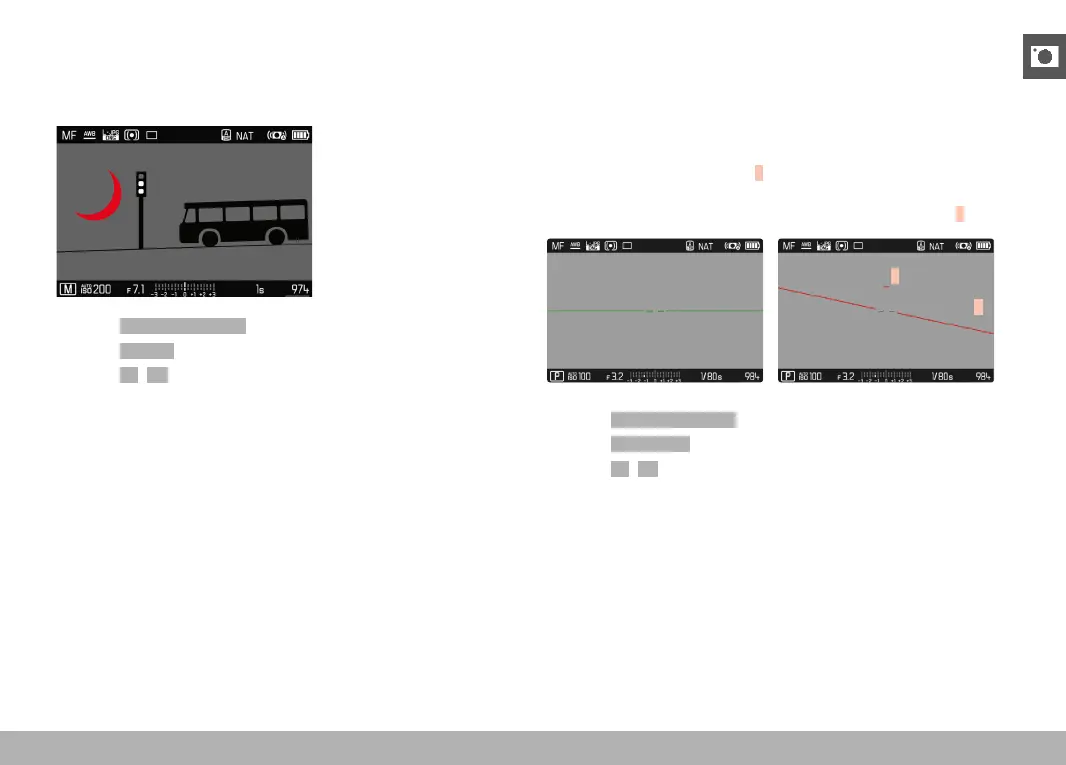
The Clipping display marks very bright image areas. This function is
a very easy and exact tool for checking the correct exposure setting.
Overexposed areas flash black.
▸ Select Capture Assistants in the main menu
▸ Select
Clipping
▸ Select On/Off
▸ Tap and hold the shutter button
• The clipping display appears.
LEVEL GAUGE
The integrated sensors of the camera show its orientation. These in-
dicators ensure exact camera orientation along the longitudinal and
transverse axes of critical objects, e.g. architecture.
Deviations in relation to the longitudinal axis (i.e. when the camera
is tilted up or down in the direction of view) are indicated by a short
line in the center of the image (
1). Deviations in relation to the trans-
verse axis (when the camera is tilted to the left or right) are indicat-
ed by two long lines to the left and right of the image center (
2).
2
1
▸ Select Capture Assistants in the main menu
▸ Select
Level Gauge
▸ Select On/Off
Note
• The camera will switch the aspect of the level gauge autonomously
for shoots in vertical format.



 To Next Page