PRACTICAL DEFAULT SETTINGS ▸ AUXILIARY DISPLAYS
80
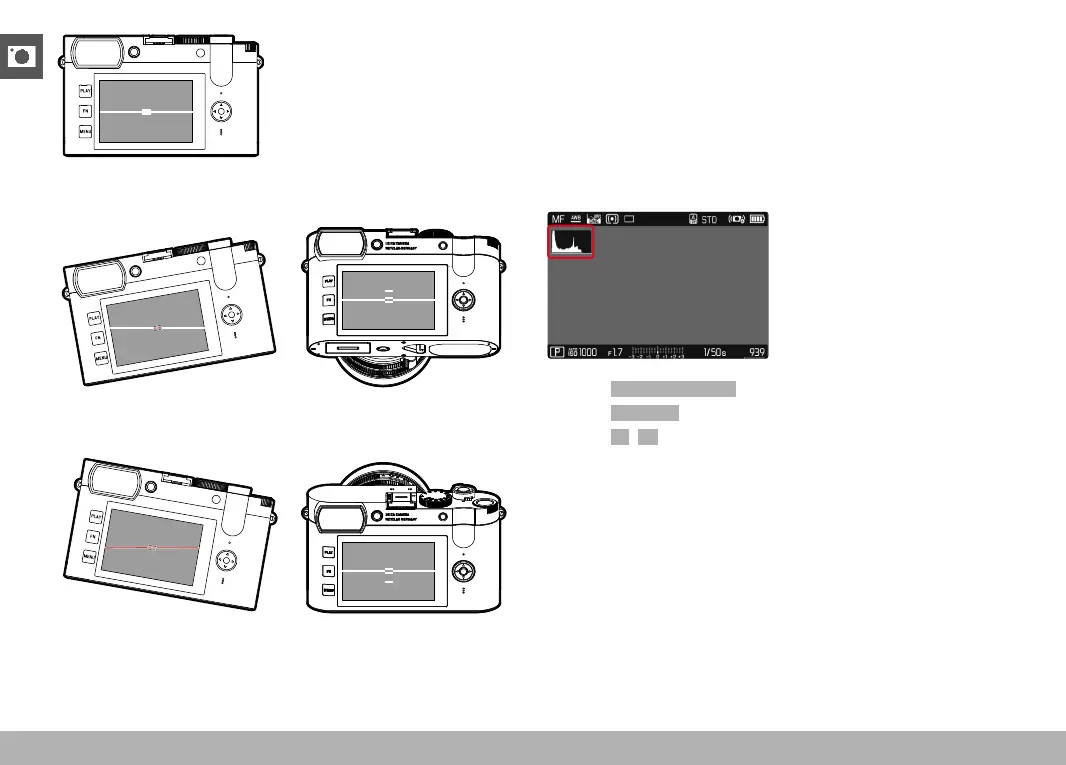
Correct alignment
Tilted laterally to the left Tilted downward in the direction
of view
Tilted laterally to the right Tilted upward in the direction
of view
HISTOGRAM
Histogram represents the brightness distribution in the image. The
horizontal axis shows the graduated values from black (left) through
gray to white (right). The vertical axis corresponds to the number of
pixels at each brightness level.
This type of rendering allows an additional quick and easy assess-
ment of the exposure setting.
▸ Select Capture Assistants in the main menu
▸ Select
Histogram
▸ Select On/Off
Notes
• The histogram is always based on the brightness displayed;
depending on the settings used, it may not represent the final
exposure.
• In shooting mode, the histogram should be regarded as a “trend
indicator”.
• The histogram during rendering may differ slightly from the one
during exposure.
• The Histogram always refers to the currently displayed cropped
section of the image.



 To Next Page