CAMERA OPERATION ▸ MENU CONTROL
49
GO BACK ONE STEP
(Return to the superordinate menu item)
▸ Press the directional pad left
• This option is only available for list-type submenus.
GO BACK TO TOP MENU LEVEL
▸ Press the
MENU button 1x
• The top level of the currently selected menu section is dis-
played.
EXITING THE MENU
You can exit the menus and submenus at any time – with/without
applying the settings selected there.
Go to shooting mode
▸ Tap the shutter button
Go to review mode
▸ Press the
PLAY button
SUBMENU
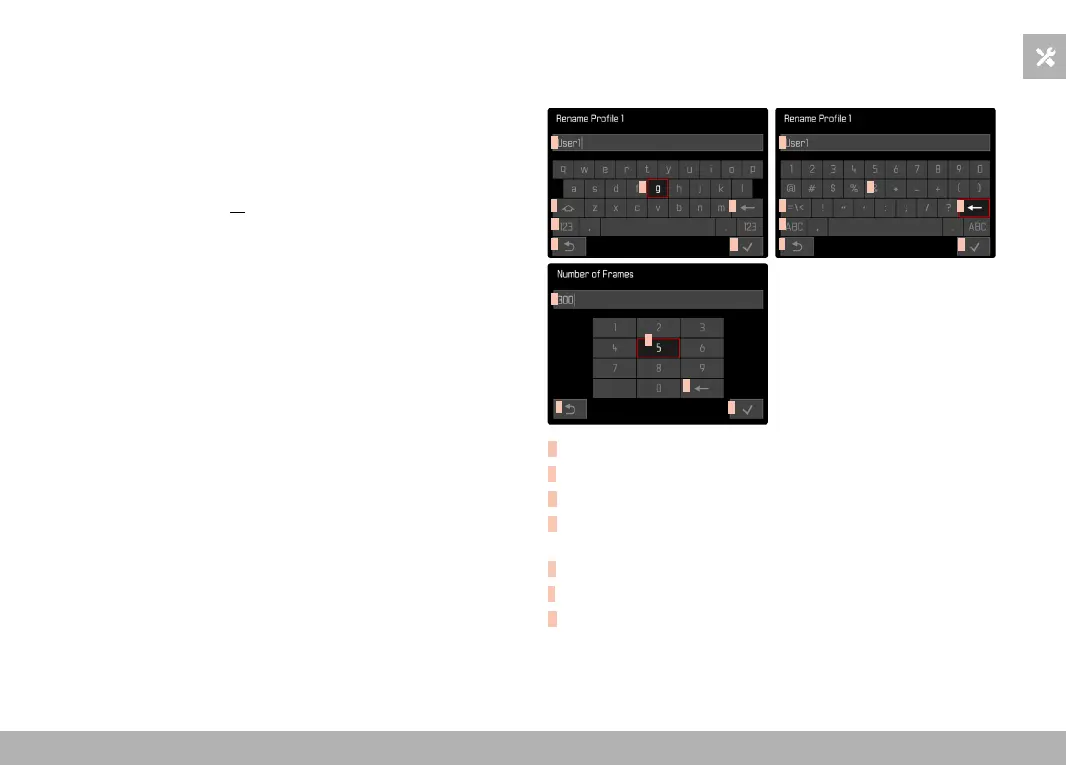
KEYBOARD/NUMBER PAD
D
C
B
E
A
F
G
D
C
B
E
A
G
G
A
E
C
B
D
A
Entry line
B
Keyboard/Number pad
C
“Delete” button (deletes the last character entered)
D
“Confirm” button
(to apply individual values and existing settings)
E
Return to previous menu level
F
Shift key (toggles between upper and lower case letters)
G
Changing the character type


 To Next Page