PRACTICAL DEFAULT SETTINGS ▸ AUXILIARY DISPLAYS
77
TOUCH AF + SHUTTER BUTTON
The combination Touch AF + Release allows a direct placement of
the AF metering field for immediate recording.
▸ Select
Focusing in the main menu
▸ Select
Touch AF
▸ Select Touch AF + Release
▸ Tap the LCD panel in the desired position
Note
• The metering field cannot be reset as usual via a double tap if
Touch AF + Release is activated.
TOUCH AF IN EVF MODE
Touch AF is deactivated by default when EVF is in use to prevent any
inadvertent altering of the AF metering field.
AF Quick Setting (see
p. 166) continues to be accessible. This function can also be disabled
if that is not wanted (e.g. when focusing with the left eye).
Factory setting: Off
▸ Select Focusing in the main menu
▸ Select
Touch AF in EVF
▸ Select the desired setting
(On, AF Quick Setting only, Off)
–
On
– Positioning the AF metering field (tap)
– Accessing the AF Quick Setting (tap and hold)
–
AF Quick Setting only
– Accessing the AF Quick Setting (tap and hold)
–
Off
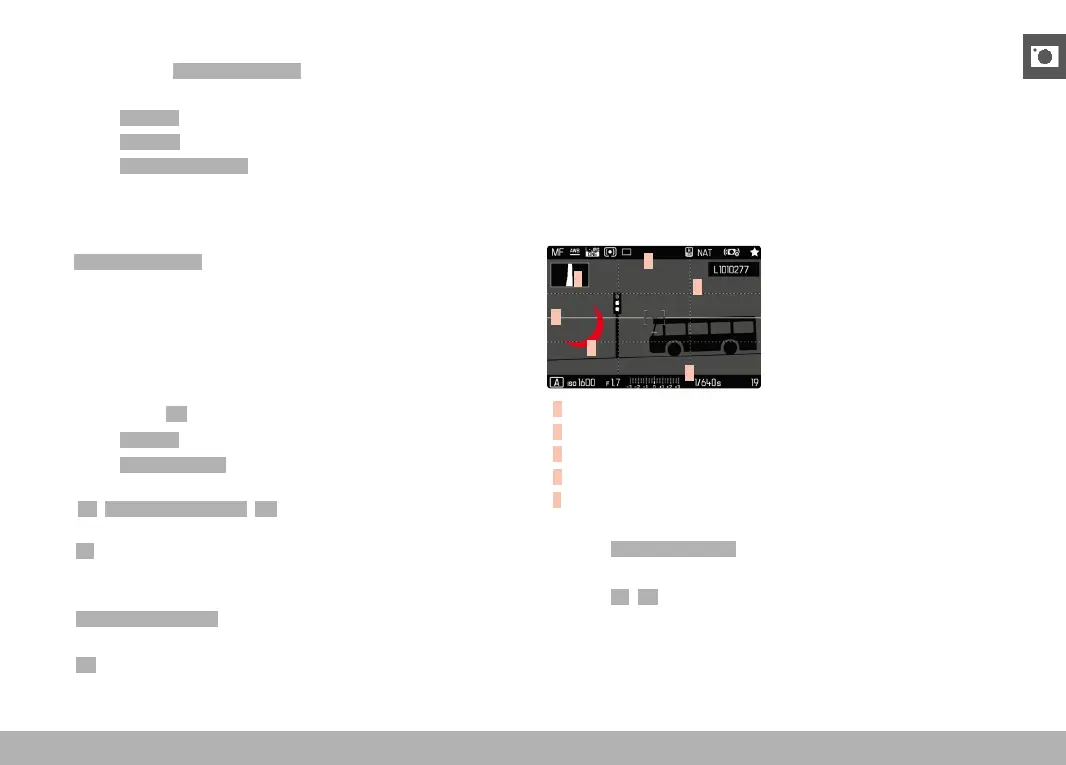
AUXILIARY DISPLAYS
You can select a number of other displays in addition to the standard
information contained in the header and footer to adapt the screen
image to your needs. The following functions are available:
– Grid (only shooting mode, see p. 78)
– Clipping (see p. 79)
– Level Gauge (only shooting mode, see p. 79)
– Histogram (see p. 80)
E
A
A
B
D
C
A
Info Bars (= header and footer line)
B
Grid
C
Clipping
D
Level gauge
E
Histogram
▸ Select
Capture Assistants in the main menu
▸ Select the desired function
▸ Select
On/Off



 To Next Page