Leidos Security Detection & Automation, Inc. – Proprietary Page 107 of 119
© 2020 Leidos. All rights reserved
42.0 Installation of Barrier Belt Option
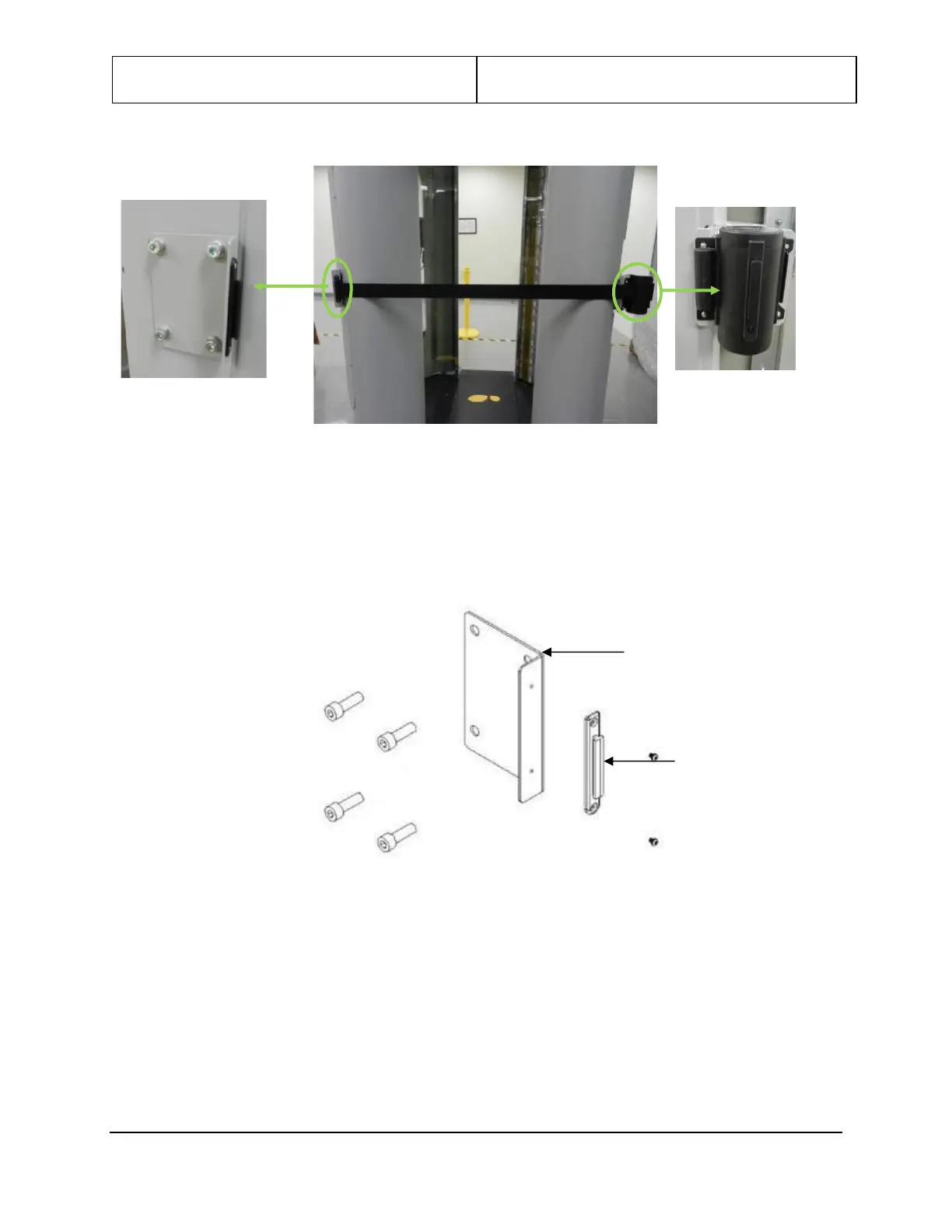
Figure 118: Barrier Belt
The barrier belt has two parts; belt canister and belt receiver. These are installed on either side of the
entrance.
1. Attach the receiver end bracket supplied with the barrier belt (0125-20359-00) to the wall mount
angle bracket (3000-20412-00 or 3000-23604-00) using two M3-0.5x4mm PPH screws (0201-20380-
04). Refer to Figure 119.
Figure 119: Receiver End
2. Attach the wall mount-angle bracket to system entrance left side mounting holes on LCD mounting
bracket (3000-23601-00X) using four each, M8x30mm FSHC screws (0201-22862-30).
3. Loosely install four .58” spacers (3000-22751-00) to entrance right-side LCD mounting bracket using
four each, M8x30mm FSHC screws (0201-22862-30), with ¼” of threads exposed.
4. Place the barrier belt bracket 3000-20411-01 over exposed threads and slide down to lock heads into
bracket keyholes. See Figure 120. Tighten bolts. Earlier version of bracket does not have keyholes.
Assemble as required.


 To Next Page