Leidos Security Detection & Automation, Inc. – Proprietary Page 83 of 119
© 2020 Leidos. All rights reserved
11.49 Floor Side Panels and Center Panel
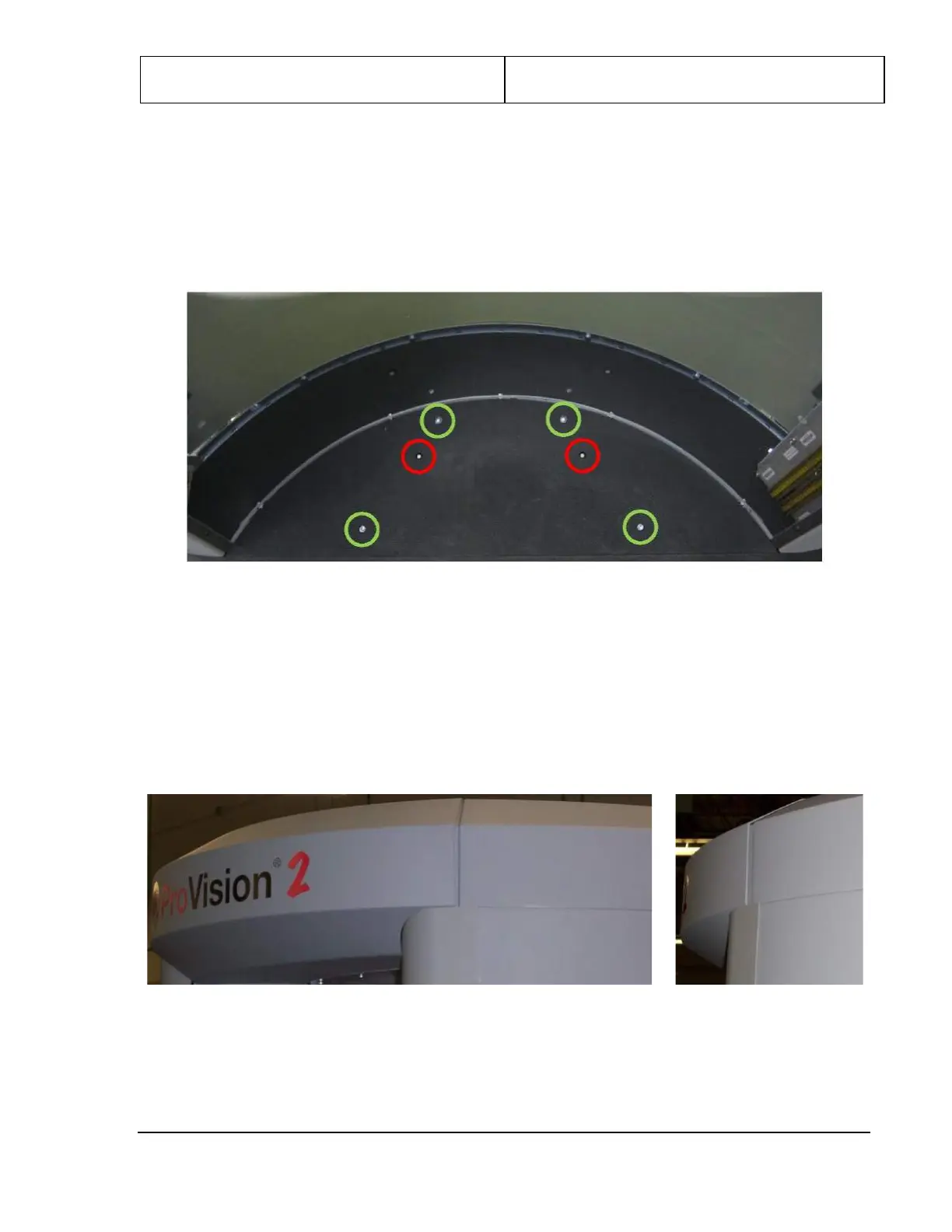
1. Install one of the two floor side panels (3810-10080-00) on either side of the floor by fitting it over
the two guide pins as shown circled in red in the following figure.
2. Fasten the panel in place with four M8 x 25mm SHC screws (0201-10018-25) in the holes shown
circled in green in the following figure.
Figure 92: Floor Side Panel
3. Repeat steps 1 and 2 for the other floor side panel.
11.50 Final Cover Fitting/Alignment
1. Adjust the top side covers and top entrance/exit covers as necessary to eliminate any gaps and achieve
best fit, as shown in the following figures.
2. When optimum fit is achieved, tighten the screws left loose in these covers and in the roof and
ceiling.
Figure 93: Cover Fitting to Eliminate Gaps


 To Next Page