5.4008.8573.0 B
4-22 Description and Operation
4.3.8.3 WiFi Configuration
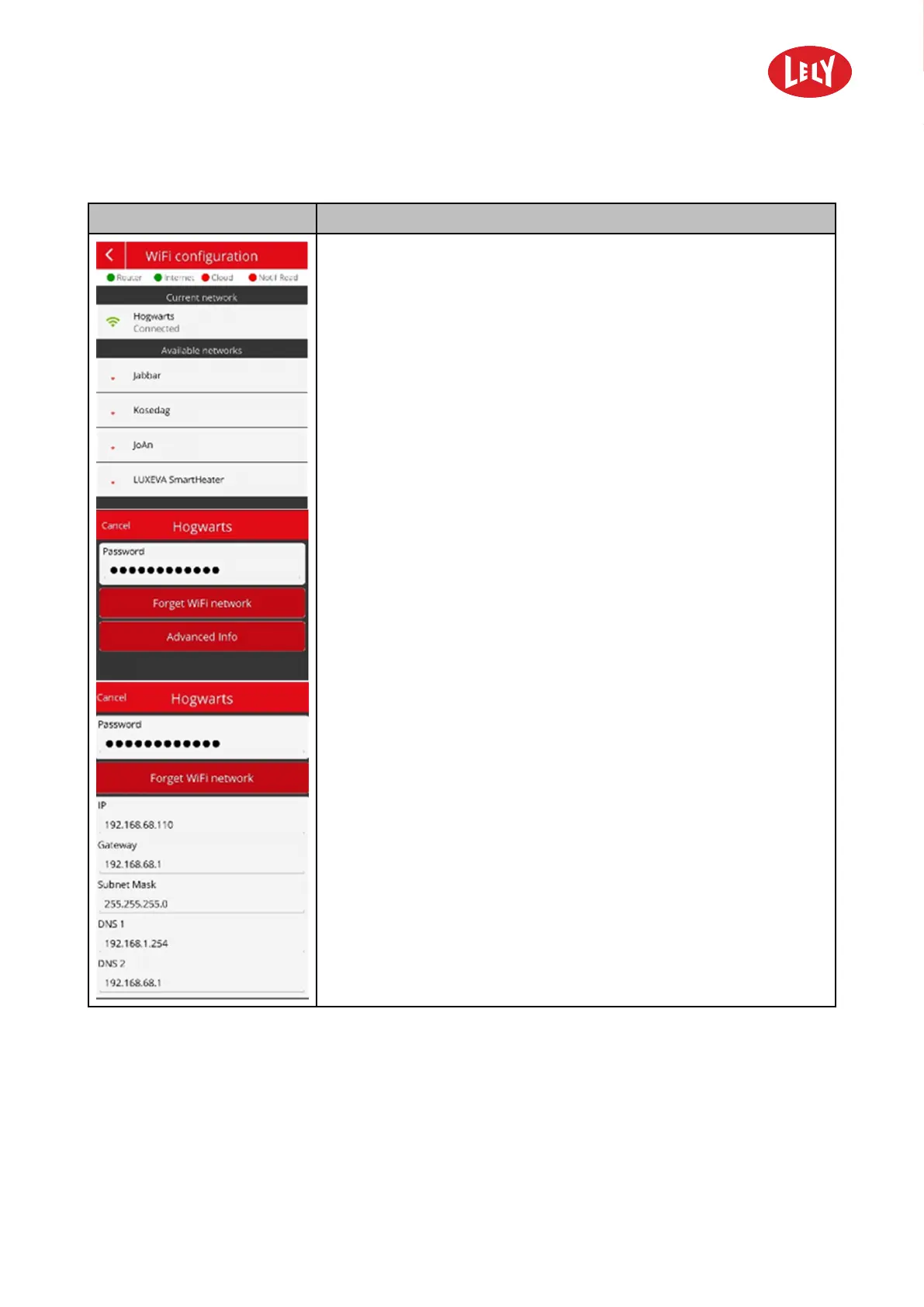
Display Description
• The row of LED indicators at the top of the screen display:
• Router: the status of communication between the robot and the
router (green: communication is active).
• Internet the status of the internet connection (green: the
connection is established).
• Cloud: the status for connection to the cloud (green: the
connection is established).
• Notif Read: the read status of a notification in the Signals app
(green: the notification is read).
• Current Network: wifi network name that is connected.
• Available networks: other available networks
Please note that for security, it is only possible to connect to networks
with a password and that the password length must be at least eight
(8) characters.
When you tab on the network name two buttons appear:
• Forget Wifi Network: removes the password for this network. After
that you can select a different network or the same with the correct
password.
• Advanced info: Shows the following numbers:
• IP.
• Gateway.
• Subnet Mask.
• DNS 1
• DNS 2
in novators in agriculture



 To Next Page