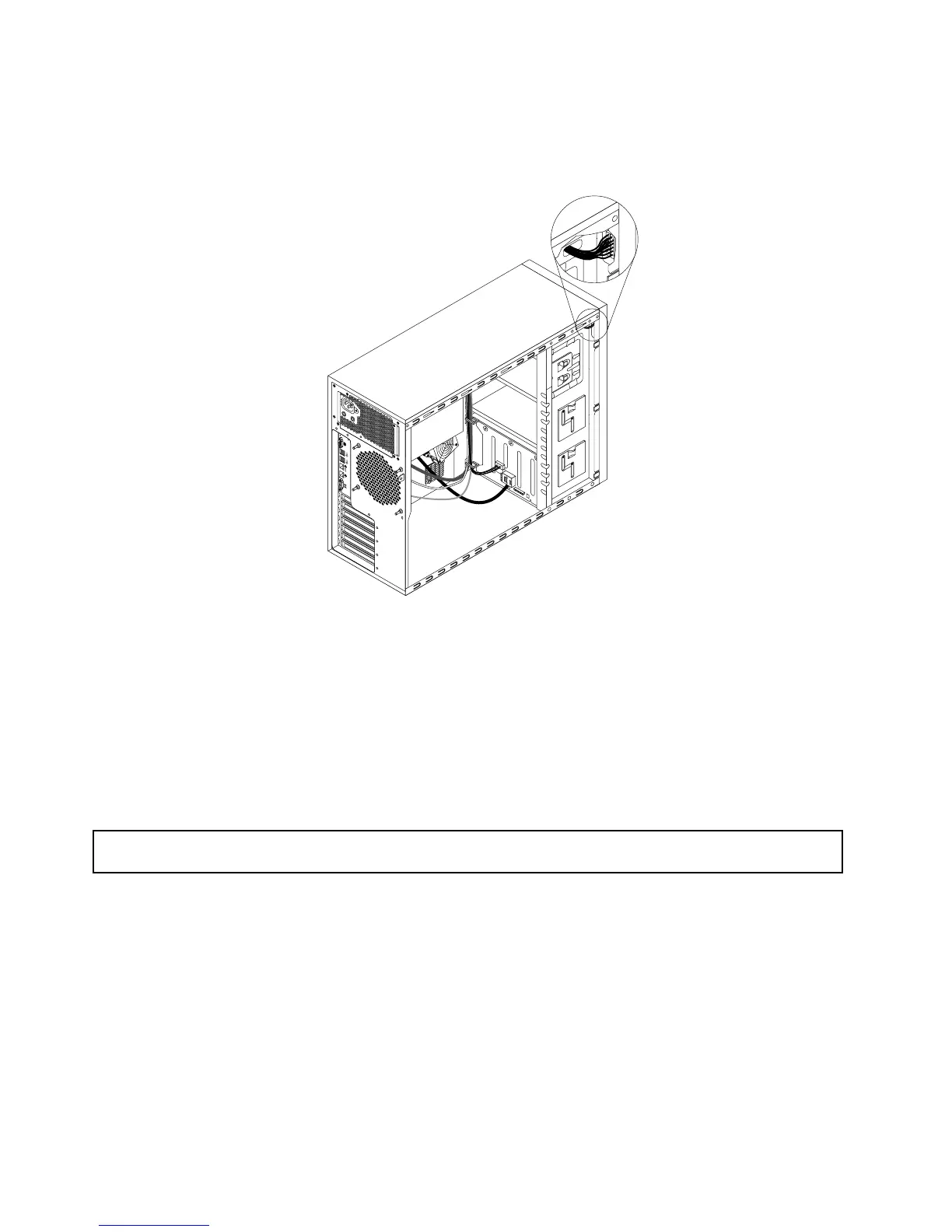
8.ConnecttheotherendofthesignalcabletotheIDMconnectoronthesystemboard.See“System
boardcomponents”onpage48
.Then,properlyroutethesignalcableoftheIDM.Youmightneedto
securethesignalcablewithcableclipsortiesinthechassis.
Figure63.Cablerouting
9.Reinstallthefrontsystemfans.See“Replacingthefrontsystemfan1”onpage183.
10.Reinstallthefrontbezel.See“Removingandreinstallingthefrontbezel”onpage87.
Whattodonext:
•Toworkwithanotherpieceofhardware,gototheappropriatesection.
•Tocompletetheinstallation,goto“Completingthepartsreplacement”onpage200
.
Removingtheintelligentdiagnosticsmodule
Attention:Donotopenyourserverorattemptanyrepairbeforereadingandunderstanding“Safetyinformation”
onpageiii
and“Guidelines”onpage83.
ThistopicprovidesinstructionsonhowtoremovetheIDMifyourserverhasanIDMinstalled.
Beforeyoubegin,printalltherelatedinstructionsorensurethatyoucanviewthePDFversiononanother
computerforreference.
Notes:
•IfyouremovetheIDM,theserverwilllosethediagnosticLEDsontheIDMpanel.
•Dependingonthemodel,yourservermightlookslightlydifferentfromtheillustrationinthistopic.
ToremovetheIDM,dothefollowing:
124ThinkServerTD340UserGuideandHardwareMaintenanceManual







 To Next Page